
C64 OS Networking Guide
Introduction: Part II
Traditionally, when we think about networking on the Commodore 64, we think about dial-up modems, terminal emulation software, and BBSes. If you were very lucky, you might have had access to QuantumLink (Q-Link), a dial-up service dedicated to the Commodore 64 and 128 computers that eventually transitioned into America Online (AOL).
Real dial-up modems are a thing of the past. Fortunately, we have access to a wide variety of TCP/IP-based modem emulators. These connect to modern home networks, perform all of the TCP/IP work inside the modem and present an interface of commands to the Commodore 64. For example, the command to dial a phone number has been replaced by a command to open a TCP/IP socket connection.
What does it all mean?
What does this actually mean for us? How does this underlying technological transformation affect what the old breadbin can do with networking?
The Commodore 64 came to maturity in the age of the BBS, before the World Wide Web was invented, and before other older internet protocols for email, chat and file transfer became a regular household experience. The rise of TCP/IP-based modem emulators has led to the proliferation of internet BBSes. Many of these are still hosted by real Commodore computers, just like they were in the old days. And the same venerable terminal emulation software can still be used, like Novaterm or Desterm, and some even have recent support and development like CCGMS.
Accessing BBSes will forever remain a nostalgic and entertaining part of retro-computing; it's what we grew up with. But how BBSes work and what the C64 can do with them does not even begin to compare with what a Commodore 64 is capable of now that it has direct access to the internet.
The purpose of this guide is, firstly, to provide the practical information necessary to connect C64 OS to the internet, which was the subject of Part I. But secondly, it is to explore and explain how C64 OS approaches networking, and how this unlocks powerful new applications that we perhaps never imagined our C64 would be able to do.
Sometimes the most unlikely candidates can achieve the most extraordinary things. Unattributed aphorism
Part II: Advanced Networking
Network Stack
Part I of this guide provided a very general overview of the network stack so that you could identify its various parts in the system directory, such as libraries, drivers, configuration files and the Apps and Utilities that take advantage of them.
Here we will dig deeper into the role that each part plays in creating the network stack. For now, we will ignore what goes on outside the C64 and focus only on things that are directly in or connected to your computer. We'll return later to discuss the server-side components.
It's called a stack because there are multiple software and hardware components layered on top of each other. Each layer communicates with neighboring layers, allowing the topmost layer, the Application's business logic, to be completely abstracted from and independent of details found in lower layers.
Network Hardware
The network hardware is what transmits and receives information to and from the outside world. In a modern computer the networking hardware is quite low-level and depends on extensive implementation in software executed by the CPU. Hardware devices like this exist for the Commodore 64 too, for example, the RR-Net and 64NIC+ ethernet adapters.
C64 OS does not support these devices. Instead it requires a smart network hardware device with the following requirements:
- Ability to open at least one TCP/IP socket
- Asynchronous bi-directional data flow
- Support for hardware flow control
- Support for connection status signal
There are a few different kinds of smart network hardware. Some emulate a modem and communicate via RS-232 over the user port. Some emulate a modem but are paired to an ACIA chip to handle the RS-232 communications. These could be two devices chained together, like a highspeed RS-232 device connected to a Swiftlink or Turbo232 cartridge, or combined into a single device, like a Link232 Wifi. Others emulate a modem and also emulate an ACIA chip as part of a single implementation.
Each of the above emulates a modem in some way, including Hayes commands. Another kind of smart networking device altogether does not pretend to be a modem but uses a different API to open a TCP/IP connection, such as WiC64.
Flow Control: RS-232 signals to modems must provide a way to pause and resume the flow of incoming data. This is a common feature of modems going back a long time, but not every modem emulator on the market today supports these signal lines. Originally these signals were translated into the exchange protocol between the two connected modems, now they are translated to the flow control mechanisms native to TCP/IP. Network hardware that isn't based on RS-232 doesn't need these specific signals, as long as there is some way to regulate the flow of incoming data.
Carrier Detect: RS-232 signals also usually include a carrier detect signal. This is a dedicated line that is asserted when the modem establishes a connection to the other modem; it indicates that the modem is online. The carrier detect signal is unasserted when the connection is lost or when one or the other side hangs up. Again, not all modem emulators today implement this signal. Network hardware not based on RS-232 needs some way for the online status to be detected. Being online in the modern context means that a TCP/IP socket connection is presently established.
Network Hardware Drivers
The job of the network hardware driver is to abstract everything about the physical network hardware into a common software API.
The hardware driver must support:
- Communication with the hardware
- Ability to command the hardware to open a TCP/IP connection
- Detecting the carrier detect status of the hardware
- Buffering raw data received and transmitted
- Asserting flow control mechanisms before the receive buffer overflows
Hardware Communication: If the hardware speaks RS-232 over the user port, the driver must implement that RS-232 protocol. If the hardware communicates via an ACIA chip (such as the 6551), the driver must implement the communications with that chip. For other kinds of network hardware the driver must implement support for however that API works. An example of this is the WiC64 custom communications protocol, which is over the user port but is not at all based upon RS-232.
Open TCP/IP Connection: To open a TCP/IP socket a modem emulator will use a Hayes command that closely parallels the command to dial a phone number. Such as:
atdt"services.c64os.com:6400"
However the exact syntax, with or without quotes, extra spaces, how the port is specified, etc. varies based on the firmware installed on the device. The hardware driver is responsible for speaking the language of that firmware in order to open the TCP/IP socket.
Carrier Detect: Modem emulators communicate carrier detect via a special status bit on the ACIA chip or via a dedicated line over the user port. Although there are standards, a modem could use a non-standard user port line. There is also ambiguity about whether asserted means the signal is high or low. These are the responsibility of the driver to detect, interpret, and pass on to the next layer.
Flow Control: The network hardware driver is responsible for creating receive and transmit buffers, if necessary, in the C64's main memory. As data is received from the TCP/IP socket, the driver's job is to buffer that data for the next layer to analyze. The driver is not responsible for the content of the data it is buffering. If its receive buffer is close to filling up, the driver is responsible for asserting flow control on the hardware by whatever mechanism it uses.
Similarly, a raw stream of data will be written to the driver for transmit. It is the responsibility of the driver to buffer the data for transmit, if necessary, while sending it out to the network hardware. Transmit buffer overflows are less common than receive buffer overflows. Flow control for transmitting data typically works like this: The layer above sends a byte to the driver to transmit. If the transmit buffer is full the driver goes into a loop waiting for a space in the transmit buffer to become available before returning control to the caller.
Under conditions of high transmission volume (such as uploading a big file) combined with slow network hardware (such as 2400 baud RS-232 over the user port), this could result in the C64 OS main event loop getting delayed and the UI becoming less responsive. This is a small price. In terminal emulator software for the C64, uploading a file is usually modal and completely occupies the machine. It usually only leaves an option to abort the upload altogether.
Network Library
In C64 OS, the network library (network.lib) is the coordinator of the various parts.
An Application that wants to use the internet loads the network library and tells it to take the operating system online. Precisely what it has to do depends on what else is going on in C64 OS. For example, it could be that in some other app bank another Application has already gone through this process. In which case, the network hardware already has a TCP/IP connection open and the OS is already online. In this situation, it has some things to do but its total workload is truncated.
Another situation could be that a Utility wants to use the internet, so it loads the network library, but the Application running in this bank has already loaded in the network library. In this case, it has far fewer things to do.
The full network stack is relatively large for a computer with only 64KB of main memory.
| Component | Size |
|---|---|
| Driver | 3 to 5 pages |
| Network Library | 5 pages |
| CNP Library | 4 pages |
The total size of the network stack is from 12 to 14 pages or ~5% of total memory. For this reason, no part of the network stack is loaded into memory in an app bank where neither the Application nor a Utility needs to access the internet. The network status flags are the only thing maintained in every app bank. This is a single byte in workspace memory that holds bit flags about the status of the network configuration.
The first time the network stack is started up, the network library goes through the following steps:
- Read in the network settings
- Load the network hardware driver
- Load the CNP library
- Configure the network hardware driver
- Command the driver to join a WiFi access point
- Command the driver to open a TCP/IP socket
- Pass control to the CNP library
The network settings are configured using the Network Utility. The user chooses:
- The driver (and some speed options applicable to RS-232 communications)
- A WiFi SSID and password (applicable for WiFi-based network hardware)
- The host and port of the CNP server
- The username and password to authenticate with the CNP server
These settings are saved in the following file:
//os/settings/:network.t
Network Settings: When the network library is loaded the first thing it does is read in all the configured network settings. These settings reside in memory that is allocated and owned by the network library. If the network settings have never been configured the network library will open the Network Utility automatically as a prompt to the user: You need to configure your network settings.
Hardware Driver: Next it loads in the network hardware driver. There is a table of drivers in workspace memory which points at the jump table of the driver for each type. Loading the driver consists of physically loading it, relocated to somewhere available in memory and then writing the address to that driver into the driver table. Whenever the network driver is installed it gets called by two places in the operating system; the NMI handler and the main event loop. This will be discussed later.
CNP Library: The network library loads the CNP library. The address of its jump table is stored in a workspace memory address so that other processes can locate it. This will be discussed later.
Configure Hardware Driver: The first time the driver is loaded it needs to go through a couple of stages to align itself with the hardware and adjust the hardware's communications speed. This is typically only necessary for RS-232 communications. If the driver has been loaded in a different app bank and the hardware has already been configured, this is indicated by the network status bits and the driver configuration can be cut short.
Join WiFi: The first time the driver is loaded it is used to tell the hardware to join a WiFi access point. If the hardware is ethernet based, or if joining the WiFi is outside the control of the Commodore 64, the driver ignores this request. If the hardware has already joined an access point, this is indicated by the network status bits and doesn't need to be done a second time.
Open TCP/IP Socket: To go online the driver is commanded to open a TCP/IP socket. A pointer to the network settings is passed through so the driver can lookup the host and port for the CNP server to connect to. If the socket is already open, that too is indicated by the network status bits and this step can be skipped.
Passing Control: The network library passes control to the CNP library when the socket opens. The CNP library gets a pointer to the network settings so it can lookup the username and password for authentication.
Understanding Information Flow
A few words need to be said about the flow of information and who controls what. The network library installs the network hardware driver, and the operating system calls different parts of the driver at different times. The driver then notifies its data handlers when something is available.
The network hardware driver has two data handlers: offline data and online data. These can be thought of as the driver providing information about the hardware itself, and the driver providing information that has been received from the remote end, respectively. The driver has a routine that allows these two handlers to be set. When the network library loads in the driver it sets itself as both of the driver's data handlers.
Network traffic is asynchronous and bi-directional, which means information could arrive from the remote end at any time. For this reason, network hardware usually drives the NMI, or non-maskable CPU interrupt. The computer could be doing anything, it could be updating the screen or processing mouse events, etc., when data arrives. The NMI interrupts whatever the computer is doing and the network hardware driver is serviced. One or more bytes are read in from the hardware and stored in the receive buffer. The NMI returns and whatever was interrupted resumes.
Eventually, the main event loop goes through another cycle. One stage of the main event loop is to check for network data being available. It calls the network hardware driver to perform this check. If there is any data in the receive buffer then the driver calls one of the two data handlers. If the hardware is offline (i.e., carrier is not detected) then it calls the offline data handler. Otherwise, it calls the online data handler. This is just a notification it doesn't pass any data.
The data handler then makes repeated calls to the driver to fetch data from its buffer and process it. Some portions are asynchronous, so it can be a bit complex to visualize the control flow. The network library has loaded in the driver. The network library has assigned itself as the data handler for both online and offline data from the driver. The network library tells the driver to tell the hardware to join a Wifi access point. The driver has to communicate that command to the hardware. If it's an RS-232 device then the command has to be spooled out to the hardware one byte at a time. The driver puts the command into its transmit buffer and the asynchronous transmit process begins. At this point, there is nothing further for the network library to do but wait. While the command is being spooled out and even after the command is fully sent and the hardware is acting on the command trying to join the access point, the C64 OS main event loop is cycled hundreds or even thousands of times and continues to process mouse and keyboard events.
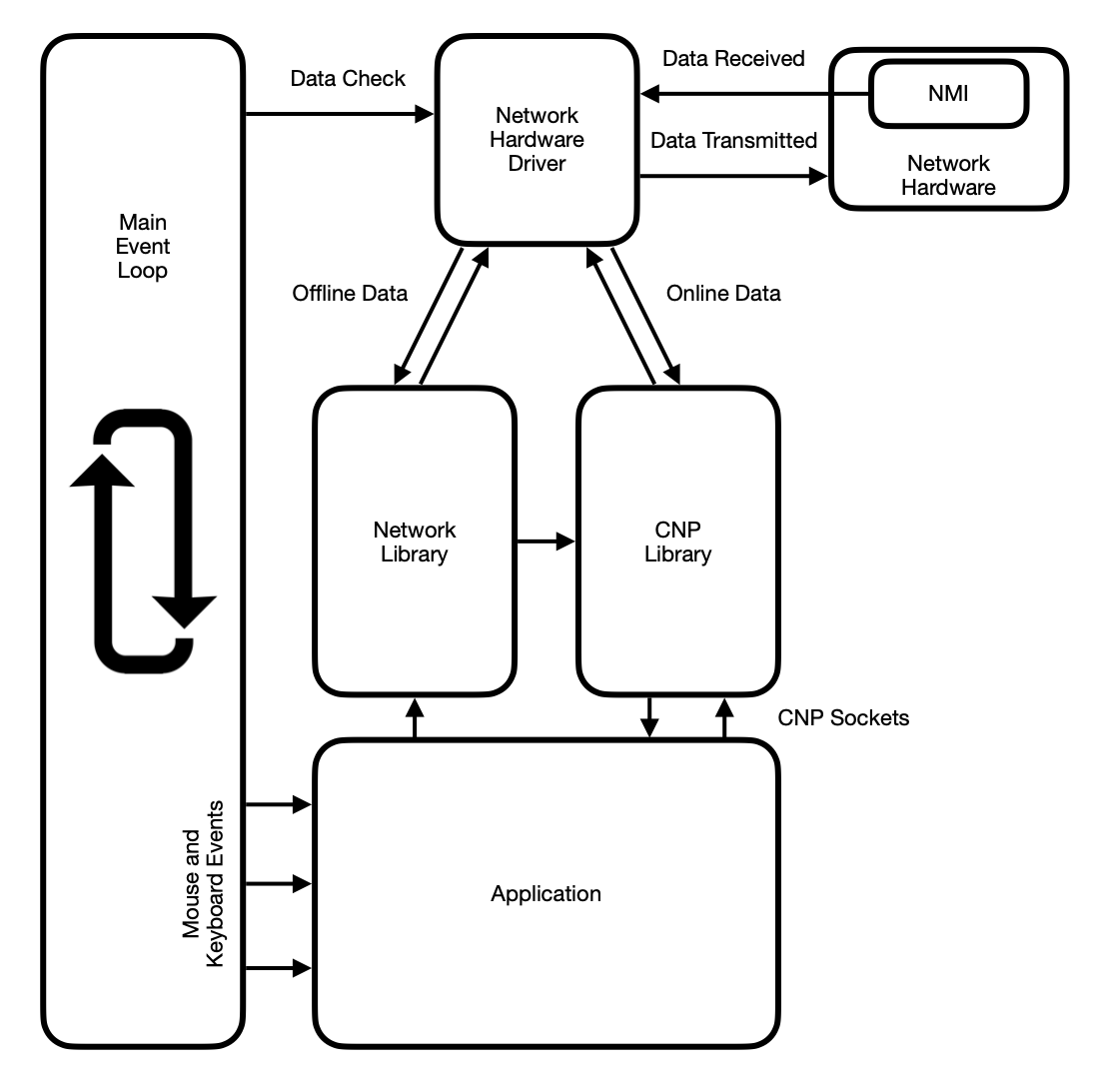
Eventually, at some unpredictable moment, the hardware returns a response. The response may consist of many bytes which have to be received one at a time into the receive buffer. As soon as there are some bytes in the receive buffer the main event loop notices that data is available. The driver calls its offline data handler and that is how the network library begins processing the response from the command to join the access point. Even this is not immediate though. The network library receives the first couple of bytes, but the command response is not complete, so it keeps waiting by returning to the main event loop. This process of receiving and waiting repeats until eventually it has the complete response and acts on it.
When it has successfully joined the access point, it tells the driver to open a TCP/IP socket. This is a similar process. The driver writes the command to open the TCP/IP socket into its transmit buffer. Again there is nothing for the network library to do. The main event loop loops many times while the driver spools the command out to the hardware and waits for a response to flow back in.
Well-behaved RS-232-based devices (i.e., modem emulators) will return the response string indicating the success of opening the TCP/IP socket before they assert the carrier detect signal. The delay can be brief, but just long enough that the buffered response code will be directed to the offline data handler. The network library processes the successful response code and passes control of the open socket connection to the CNP library. How does it do this? It makes a call to the CNP library, passing a pointer to the network settings so it can lookup the username and password. And at this point, the job of the network library is done, until the carrier is dropped when the TCP/IP socket connection is closed or lost.
CNP Library
The CNP library performs a few steps when asked to take control of the open socket.
- Assigns itself as the online data handler
- Transmits the authentication credentials
- Updates the network status flags
- Sends a notification message about change to network status
Assigns Data Handler: This is the fundamental way the CNP library takes control of the open data socket. It looks up the location of the driver and calls the driver's routine to set the online data handler, passing a pointer to one of its own routines. Henceforth, when data is received the network hardware driver will call the CNP library to notify it that data is available.
Transmit Authentication: The CNP library received a pointer to the memory where the network settings were loaded in. It reads the username and password, structures them as the CNP server expects to receive them, and transmits them by writing them to the network hardware driver.
Update Network Status: There is a network status flag that indicates that the connection to the CNP server is established, which means that the OS is online. Immediately after sending the authentication credentials it changes this status flag.
Network Status Notification: A simple change of network status flags is not
enough to cause an Application or Utility to jump into action. In addtion to changing the
status flags, the CNP library sends a message (mc_ntwrk) to the Application.
If a Utility is running, it sends the same message to the Utility.
Questions of Security
Authentication credentials are sent in plaintext. CNP authentication credentials are isolated, though. They are not the same as the email address and password used to access your account at c64os.com and you may change them at any time.
There are some precautions taken. When the TCP/IP socket connection is established, the CNP server sends no data; it doesn't identify itself or its version number. It simply waits for the authentication credentials to be sent. If the credentials are not sent within a configurable amount of time (typically 10 seconds), or if the credentials are invalid, it silently drops the connection. From the perspective of a bad actor that notices the port is open and tries to probe it, the connection simply drops.
Additionally, all failed login attempts are logged by IP address. There is a configurable number of failed login attempts in a 24 hour window, which, if exceeded causes the connection to drop immediately.
Losing the Connection to the CNP Server
If the connection does drop, the carrier detect signal on the modem is unasserted and the network hardware driver gets a message about the closed connection. This is directed to the offline data handler which is still the network library.
The network library effectively reverses the connection process. It reclaims control from the
CNP library by assigning itself as the online data handler again. It clears the network status
flag and reposts the mc_ntwrk message to the Application and Utility. And now
you're offline again.
The system's status bar displays the word "online" or "offline" based on the network status flags as a visual indication to the user.
Applications
Finally, we have the Application layer. The Application (or Utility) is the initiator of the process of connecting to the internet. An App that wants to go online loads the network library and tells it to take the OS online.
From this point on, everything discussed earlier is kicked into motion. Parts of the process are asynchronous, so the Application finishes everything else it needs to do, such as creating the user interface, and then it waits by returning to the main event loop.
It is not strictly necessary for the Application to listen for network status change messages, but it's never a bad idea. If the Application needs to take immediate action as soon as the internet is available, then it should definitely listen for those messages. The CNP library sends the message as soon as authentication is complete. The Application can open a CNP socket immediately in response that message.
The CNP library implements the socket API which an Application may use to connect to any listening socket on the internet. The job of the CNP library and the CNP server working together is to allow C64 OS Apps and Utilities to open multiple simultaneous socket connections with complete abstraction from the lower levels of the stack.
C64 Network Protocol
Once online, the CNP library is the intermediary that all network activity passes through. Even though the network hardware driver abstracts communication with the hardware and manages low-level flow control, which is a helpful layer, an Application still never interacts directly with the driver.
The CNP library owns the connection that the driver has established. Raw bytes of data are never received or sent through the driver that are not part of a CNP packet.
CNP Packets
The total network bandwidth is shared by multiple virtual data pipelines. Each pipeline connects a specific process in C64 OS with a service on the internet. Therefore, it makes no sense for a raw byte to come through the network. Without context it would be ambiguous what that byte represents or who it is destined for. Instead, a segment of a data stream is wrapped in a packet.
A packet always consists of a header and may optionally include payload data. TCP/IP packets have quite a bit of overhead, but they need it because they directly connect any two points on the internet. CNP packets are smaller and simpler, but they are not required to route all the way between two arbitrary points on the internet. CNP packets are only transferred between the computer running C64 OS and the CNP server it is connected to. The CNP server bridges the CNP connection to a TCP/IP connection. All the robustness and complexity of TCP/IP is being managed between the CNP server and the remote service. This allows the packets sent between the C64 and the CNP server to be much lighter and more streamlined.
A CNP packet header is variable in length. The shortest packet is just one byte with no payload data. The longest packet is a 4 byte header with up to 256 bytes of payload data.
A CNP packet consists of the following fields:
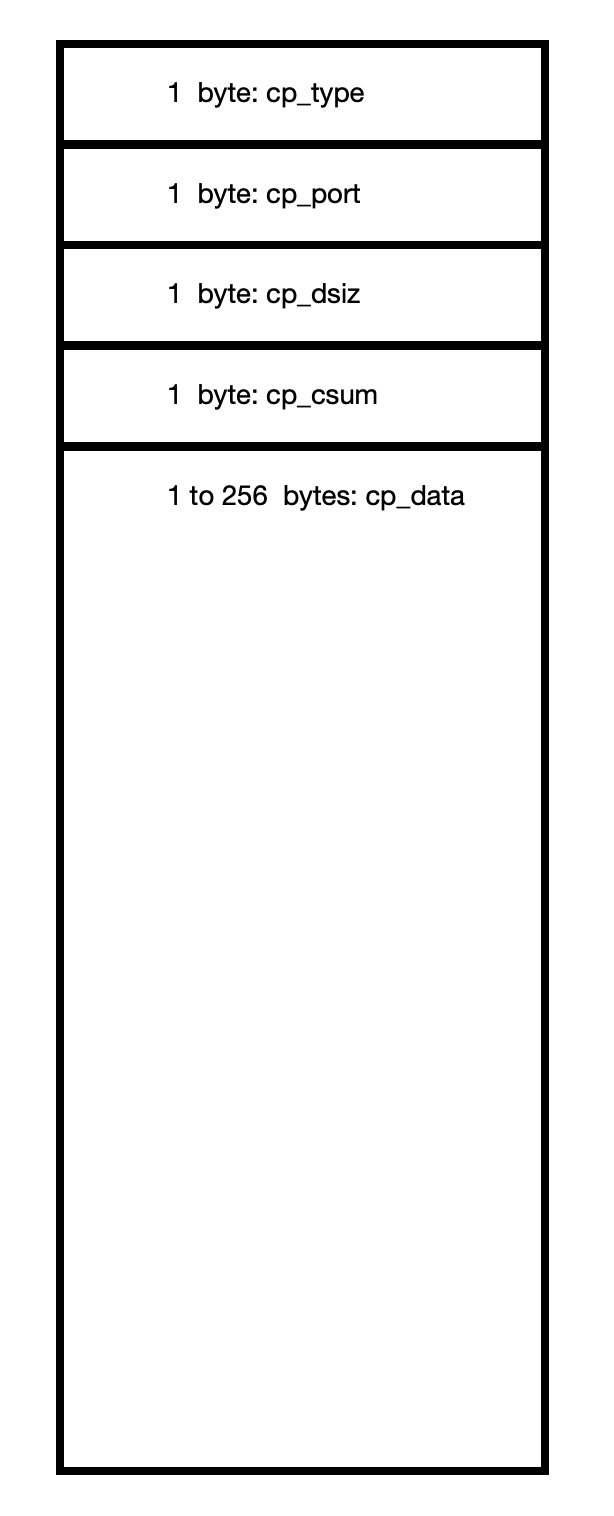
All data that is sent or received comes in the form of one of these packets. The first byte of the header is the packet type and each type has a defined header length. For example, a keep alive packet type is defined as a single byte.
When the CNP library is in a waiting state, between packets, it expects that the next byte to arrive will be the start of a packet. Since the first byte of the packet is the packet type, it uses that to know what to expect about the rest of the packet. If the packet type is a keep alive, then that whole packet is just one byte. It is a completely valid packet, but because it is defined as only one byte, the CNP library immediately returns to the state of waiting for the next packet. Keep alive packets are sent periodically to maintain the C64's connection to the CNP server.
Port: Pipeline Identifier
Each virtual pipeline of data gets an identifier. That identifier is called the port. The second byte of the packet header is the port and every packet (other than a keep alive) has a port number to indicate which pipeline it belongs to.
A CNP port is different than a TCP/IP port. It is used only to identify the virtual data pipelines running between the C64 and the CNP server. The port byte is divided roughly into two halves, the upper 5 bits and the lower 3 bits.
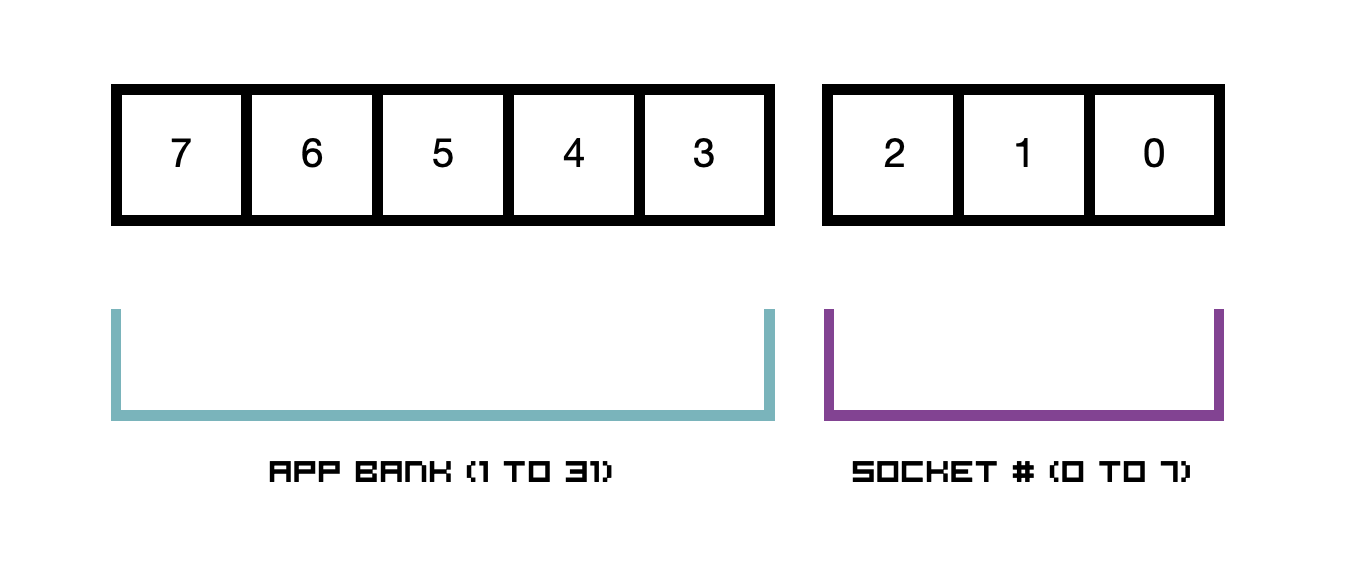
The C64 Network Protocol was designed specifically with features of C64 OS in mind. C64 OS supports Fast App Switching which allows up to 31 Applications open at the same time, provided you have an REU with a large enough capacity. Each bank can theoretically hold an Application or Utility that accesses the internet. The upper 5 bits of a port hold the Application bank number. The lower 3 bits are allocated dynamically and used to uniquely identify up to 8 virtual pipelines per app bank.
Since one app bank runs just one Application at a time, and optionally one Utility, the App and Utility together may open a maximum of 8 CNP connections. In practice, for a Commodore 64, this is more than enough.
The total number of simultaneous connections that the C64 Network Protocol can support, therefore, is 31 banks times 8 connections per bank, for 248 total connections. Remember that this is totally abstracted from the underlying network hardware. From the lowliest user port modem emulator running at 300 baud to the fastest ethernet modem with a virtual Turbo232 running at 230Kbps, they are all equally able to carry up to 248 virtual CNP data pipelines.
Packets for signals
There are a number of packet types used for signaling. These packets do not carry any data and are, therefore, defined as having only a 2-byte packet header and no payload. These 2-byte packets consist of the type, which is itself the signal, and the port which identifies the virtual data pipeline to which the signal applies.
| Packet Type | Signal |
|---|---|
| pt_close | The connection has formally closed |
| pt_time | The connection has closed due to timeout |
| pt_pause | Request to pause traffic on this connection |
| pt_resume | Request to resume traffic on this connection |
| pt_ack | Acknowledges successful receipt of last packet |
| pt_nak | Negative acknowledgement of last packet |
pt_close: Either side can send this. If the remote TCP/IP connection sent some data and then closed the connection, the CNP server will send all that data to the C64 and then send a close packet.
The C64-side can also send a close packet to formally close a connection.
pt_time: There are a couple of reasons why this gets sent. It is a more abrupt form of closing a connection. The C64, for example, may attempt to send a packet to the CNP server, and if the CNP server doesn't know about the port number it replies with a timeout so the C64-side will immediately treat that connection as no longer existing.
pt_pause: This is a connection-level form of flow control. The CNP server is essentially always ready to receive data, but the C64 is often not able to receive data. The C64 can send a pause signal and the CNP server will begin to buffer data that is still arriving from the remote TCP/IP connection.
A pause signal can be sent at any time, or it can also double as an acknowledgement of a received packet. For example, if an Application is about to be switched to the background and it has an open connection, it is prudent to pause that connection so that data won't be sent to it while it's in the background. Alternatively, if an Application receives a packet but needs time to process it, it can send a pause signal to acknowledge but request a wait before the next packet is sent, all in the same step.
pt_resume: This is the reverse of a pause signal. Typically only the C64-side will send a resume after it has previously sent a pause. For example, if an Application switches into the foreground it can resume a connection that it paused when the App went into the background.
pt_ack: An acknowledgement signal is contextual. It acknowledges receipt of the most recent packet. For example, when the C64 opens a connection, it will get an acknowledgement to mean that the connection successfully opened. If either side receives a packet of data, an acknowledgement is sent to indicate that it was received and it is ready to receive more.
pt_nak: A negative acknowledgement signal is also contextual. It reports a failure of the most recent packet. For example, if the C64 tries to open a connection to a service on the internet but the remote end doesn't exist (can't be resolved) the CNP server replies by sending a negative acknowledgement. If a packet of data arrives, but its checksum fails, a negative acknowledgement means that that data packet was damaged and should be sent again.
Opening a Connection
Packets of types other than keep-alives and the signals discussed above come with data payloads. A packet that carries a data payload has a full 4-byte header. In addition to the type and port, the header includes a data size and a checksum byte.
The data size byte ranges from 0 to 255, where zero means a full 256 bytes, since no data carrying packet has a zero-length payload.
The checksum is a simple XOR of all the bytes in the payload.
To open a new connection a packet of type pt_open is sent from the C64 to the CNP
server. The port is generated automatically. It combines the current app bank number with one of
the 8 available connections for this bank. This is done by picking one not currently in use.
The data payload of a pt_open packet is the TCP/IP socket connection string. This
consists of either a domain and port number or an IP address and port number, separated by a
colon. For example, to open a connection to a webserver the data payload of the open packet
could be:
www.somewebsite.com:80

or

179.201.13.141:80
Because the connection string is the data payload of a CNP packet, it cannot exceed 256 bytes. The data size field in the header is the length of the string and the checksum is computed just as it is for any data packet.
Note that C64 OS does not manage DNS. If a connection string holds a domain name, such as
www.somewebsite.com the IP address of that domain is resolved by the DNS servers
used by the CNP server at the time when the CNP server attempts to open the TCP/IP connection.
Data Transmission
Finally, once a virtual pipeline has been opened, data can flow in both directions. Data on a
connection is always carried by a pt_data type packet. The port indicates the
connection the packet belongs to, the data size indicates how long the payload is, and the
checksum is computed on the payload by the sender.
When the receiver receives a data packet it computes the running checksum as the payload data
arrives. It compares this to the checksum from the header. If they don't match it replies with
a pt_nak. The negative acknowledgement is handled by the CNP layer, below the layer
of the Application. If the CNP layer receives a damaged packet, it signals the nak so the packet
is sent again, and the Application doesn't even know that that happened.
If a packet is received and the checksum passes, the CNP layer notifies the Application. The response of the Application, depending on what it needs, may result in the CNP layer returning either an acknowledge, a pause, or even a close. The acknowledge, as mentioned above, signals to the sender that the receiver not only successfully received the last packet but is ready to receive the next one.
The power of the C64 Network Protocol is that packets belonging to different virtual connections can be interleaved. One connection can be paused while others are not. One connection can be sending data, while at the same time data is received on another connection. One Application may open more than one socket at the same time. One socket may be used for command and control while another socket may be used for transferring data. This is very powerful, not only can different processes use the same network hardware at the same time, but even a single process can have multiple communications channels so that control is neatly separated from data.
Service Packets
There is one other kind of packet not yet discussed. Packets of type pt_serv are
called service packets and are used to send commands from the C64 directly to the CNP server.
This opens a lot of possibilities for the future. For example, as mentioned above, the C64 does not manage DNS lookups. The CNP server performs those lookups implicitly. Although this is not currently implemented, a service command could tell the CNP server to use a different DNS server for this C64↔CNP-server session.
CNP server v2.0 implements a token-based authentication service. Service packets are used to request the creation of a temporary authentication token. Learn more about the CNP Authentication Protocol.
The reasonable man adapts himself to the world… all progress depends on the unreasonable man. George Bernard Shaw
Socket API
Packets and ports, headers and checksums, these are details about how the C64 Network Protocol works, and these details are handled under the hood by the CNP library.
Applications that use networking don't deal with the technical details of the protocol, instead they use the CNP Socket API.
Sockets
CNP supports 8 simultaneous virtual data pipelines per app bank. A connection, once opened, joins two endpoints across the internet allowing data to flow between them. The proper name for an endpoint is a socket.
A socket is a software mechanism that allows an Application to receive data from a virtual pipeline and to send information into that pipeline. The socket is also a means for the Application to receive notifications about changes to the status of the connection.
Technically a socket can exist even though the connection between it and the remote endpoint has not been opened. For example, the status of the socket could indicate that the connection is opening, open, closing or closed.
Socket Structure
A C64 OS Application (or Utility) creates sockets according to its needs. A socket could be created dynamically, but most Apps don't need that level of sophistication. It is more common to create one or more sockets statically. The sockets are written as part of the Application's code, and when the App launches it simply has those fixed sockets available to be opened and used when it needs them.
For example, the Wikipedia App has two sockets that are set up and ready to go as soon as the App launches. It always has two sockets, it never creates or destroys sockets during the runtime of the Application, it just opens, uses, and closes the two that it has when it needs them. Wikipedia uses one socket to fetch the table of contents and another to fetch the article section.
Another example, the Image Search App has two sockets that are statically created. One is used for performing the search and getting search results. The other is used to fetch the graphic data for download.
A socket is an 11-byte structure with the following fields:
| Field | Size | Meaning |
|---|---|---|
| csk_name | 2 | Pointer to connection string |
| csk_stat | 2 | Pointer to status change callback |
| csk_flgs | 1 | Socket status flags |
| csk_tsiz | 1 | Transmission data size |
| csk_tsum | 1 | Transmission data checksum |
| csk_tbuf | 1 | Transmission data buffer |
| csk_rsiz | 1 | Receive data size |
| csk_rsum | 1 | Receive data checksum |
| csk_rbuf | 1 | Receive data buffer |
An Application needs only to create one of these 11-byte structures, which it can statically allocate. Most of the fields are set to zero and are used by the CNP library to track the status of the socket and manage the flow of data. The Application only needs to provide something custom for the first two fields.
Connection String: The first field is a pointer to a connection string. When the socket connection is opened this string is used to specify the remote endpoint. For example, if you wanted to retrieve a list of currency exchange rates, the socket could connect to a public API using a connection string such as:
open.er-api.com:80
Status Callback: In order to receive notifications about changes to the status of the socket connection, the Application provides a pointer to a routine that the CNP library calls.
For example, it will call the status change callback when the connection opens, closes, or times out. It will call it when the connection has data to read or when the connection is ready to have data written to it.
This is the fundamental role of a socket; it provides the Application a mechanism for interacting with the virtual data pipeline, getting data from it and writing data into it.
All the other fields in the socket structure are initialized to zero and managed by the CNP library. We will not go into further detail here about how these are used. More detailed information can be found in the C64 OS Programmer's Guide, Chapter 5: Using Shared Libraries → Library Reference → CNP.
Reading and Writing to Sockets
The CNP library provides a set of routines that are used in a very similar way to the C64 KERNAL ROM's routines for opening and closing a file and reading and writing data to a file. Anyone who has worked with files using the KERNAL ROM will find the CNP socket routines familiar.
There are some differences though. For example, when a file is opened it must be opened either for read or for write (or append.) When opened for read, data can only be read from it. When opened for write or append data can only be written to the file. Socket connections are always bi-directional.
Additionally, when reading from a file you can read any amount of data in a single continuous loop. When writing, you can keep writing in a continuous loop until you have nothing more to write. Sockets force reads and writes to be broken up into segments. When a segment arrives, the Application is notified and can read in that segment and do something with it. If there is more data to come, the Application must return to the main event loop and wait for the next notification.
Similarly, when writing data to a socket, you are told when the current segment is full. The Application has to save its place and return to the main event loop while the current segment is sent. A notification will later arrive indicating that the socket is ready to accept more data.
Reading and writing in segments makes working with sockets slightly more complicated than working with files, but this is also the mechanism that allows data belonging to different virtual pipelines to be interleaved. For example, while a file is downloading, a READYChat message can also be received, giving the whole system a degree of multitasking.
Data segmentation is also a natural way to introduce flow control. A Commmodore 64 can write data to a socket faster than the network hardware can transmit it. Data may also be received from the network faster than the C64 is able to save it to disk. Reading and writing in segments and letting the App return to the main event loop between segments allows the user interface to remain active while long streams of data are received or transmitted.
Transferring data over a network is inherently more error prone than reading a file from storage. Reading a file from storage is highly reliable. The two computers, the C64 and the drive controller, can enter into a neatly timed loop transferring long streams of data over a short cable without a single mistake. Network data is sent in packets and each packet has a checksum. If the checksum of a packet fails, that single packet is automatically retransmitted, ensuring that the whole data stream is transferred without error.
Network Proxies
A frequent point of confusion is over the relationship between the C64 Network Protocol and proxy servers that provide information to specific C64 OS Applications.
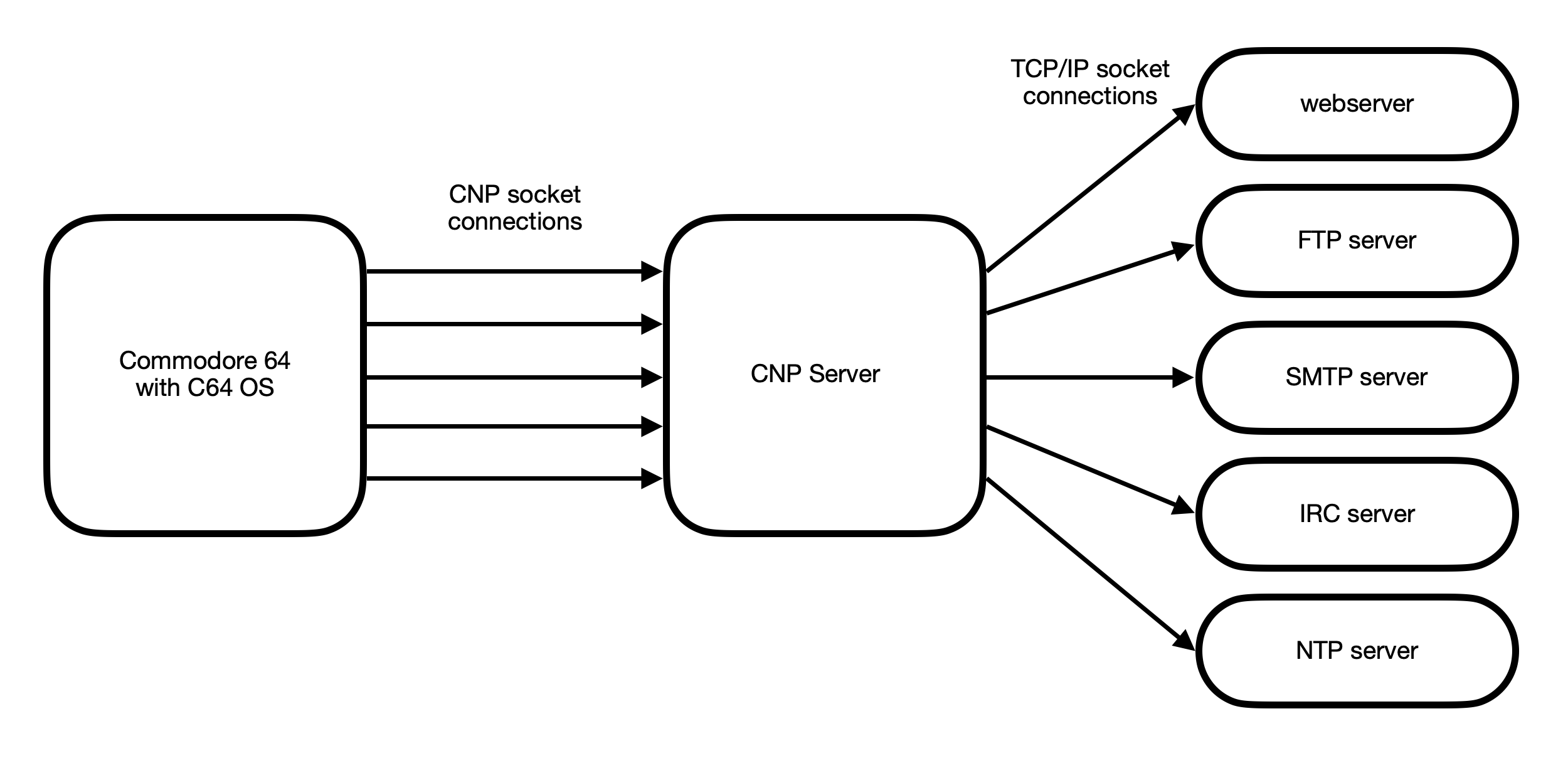
The CNP server is a generalized networking layer that enables multiple network sockets to be open simultaneously regardless of network hardware device. Each socket on the Commodore 64 is bridged to a TCP/IP socket on the remote end.
In other words, a C64 OS Application may open a CNP socket directly to any listening TCP/IP socket on the internet. This could be to an IRC server, an SMTP server, an FTP server, a webserver, or anything else. The Application can then exchange data with that server by being programmed to speak its protocol.
The CNP layer exists so that the packets the C64 receives are lighter weight than TCP/IP, and without special support from the network hardware device the C64 can still open multiple connections. The actual exchange of data is transparent. The CNP server buffers the data to help with flow control, but it does not modify, change, translate, or re-interpret the data in any way. If a C64 OS Application opens a socket connection to a webserver on port 80, the Commodore 64 is communicating directly with that server and can send HTTP commands and get raw HTML, Javascript, CSS, and other binary files in response.
The ability of C64 OS to connect to any TCP/IP socket on the internet is not a problem. The problem is, what a Commodore 64 (with 64KB of memory, a 1MHz 8-bit CPU, and 10s of kilobits of network transfer speed) can actually do with the data that it can retrieve from most modern internet services.
Connecting directly to a POP3 email server, requesting to download one email, if someone (even a spammer) sent you an attachment, that single email could be megabytes in size. The sheer volume of information delivered over from a mail server precludes the humble Commodore 64's ability to participate. It's not a matter of whether or not the C64 can implement the POP3 email protocol.
Connecting to the Wikipedia webserver is easy. But requesting an article, (say, the article about Berlin, Germany,) returns 3.4 megabytes (!!!) of HTML. It sends 29 thousand lines of text, code, styles, comments, structure, spacing, and metadata. Unless you really think about it, it is easy to forget how outrageously enormous modern internet resources have become. Just the base HTML file of a single Wikipedia page would take 14 minutes to download over a Swiftlink modem emulator. And it would occupy over 53 times the total amount of memory addressable by the 6510. Just to store it would consume over 20% of a CMD HD native-mode partition. It's not a matter of implementing the HTTP web protocol.
A Commodore 64 is dwarfed by even a modest text-centric webpage. What about a single image found on a typical website? A single graphic can easily be multiple megabytes and 15 million pixels, compressed with extremely sophisticated mathematical algorithms. Elite programmers over 20 years ago, through extraordinary ingenuity, wrote a JPEG decoder in 6502 assembly language. It consumes every byte of memory and every CPU cycle, and it takes 5.5 minutes to decode an image file that contains 320 by 200 pixels. Decoding a single modern image typically found on the web, if it could be done in stages, could take hours. And that doesn't include scaling the image so you can actually see it. You would be left with an image so vast that the C64's screen would be like looking at a wall mural through a toilet paper tube from one foot away.
Trying to download, decode and render graphics from today's web on a Commodore 64 is like trying to move a mountain with a shovel.
Purity vs Pragmatism
There is a purist argument that a Commodore 64 should operate with independence. That it should fetch from the internet what it is capable of fetching. Some argue that a kind of parallel web could be created where the interlinked resources are by their nature small and designed for retro computers.
The pragmatic argument is not about whether the purist argument is right or wrong. It faces the reality that there is already a very large collection of resources available on the internet, but that most of those resources are out of reach for a Commodore 64 because it does not have the memory, speed or computational power to acquire them.
One pragmatic point of view is that if we want to use our Commodore 64 to engage with content on the internet then our computer has to cooperate with other computers to accomplish those tasks. While a purist may argue that depending on other computers is "cheating," the pragmatist may argue that it gets the job done while providing the user with the best experience.
In this case, that experience is that the user gets to use his Commodore 64 along with a small number of peripheral devices that are general purpose, useful for other things, that he may already own, and in a reasonable amount of time he may do something fun and practical such as read Wikipedia, lookup pictures of celebrities, see where a town is on a map, get a weather forecast, check the hockey game scores, message a friend, etc.
Role of a Proxy Server
The role of a proxy server is to sit between the Commodore 64 and a service on the internet and simplify requests to that server and translate results coming back from that server. It is also useful to see where the proxy server sits in the chain that includes CNP sockets bridging to TCP/IP sockets.
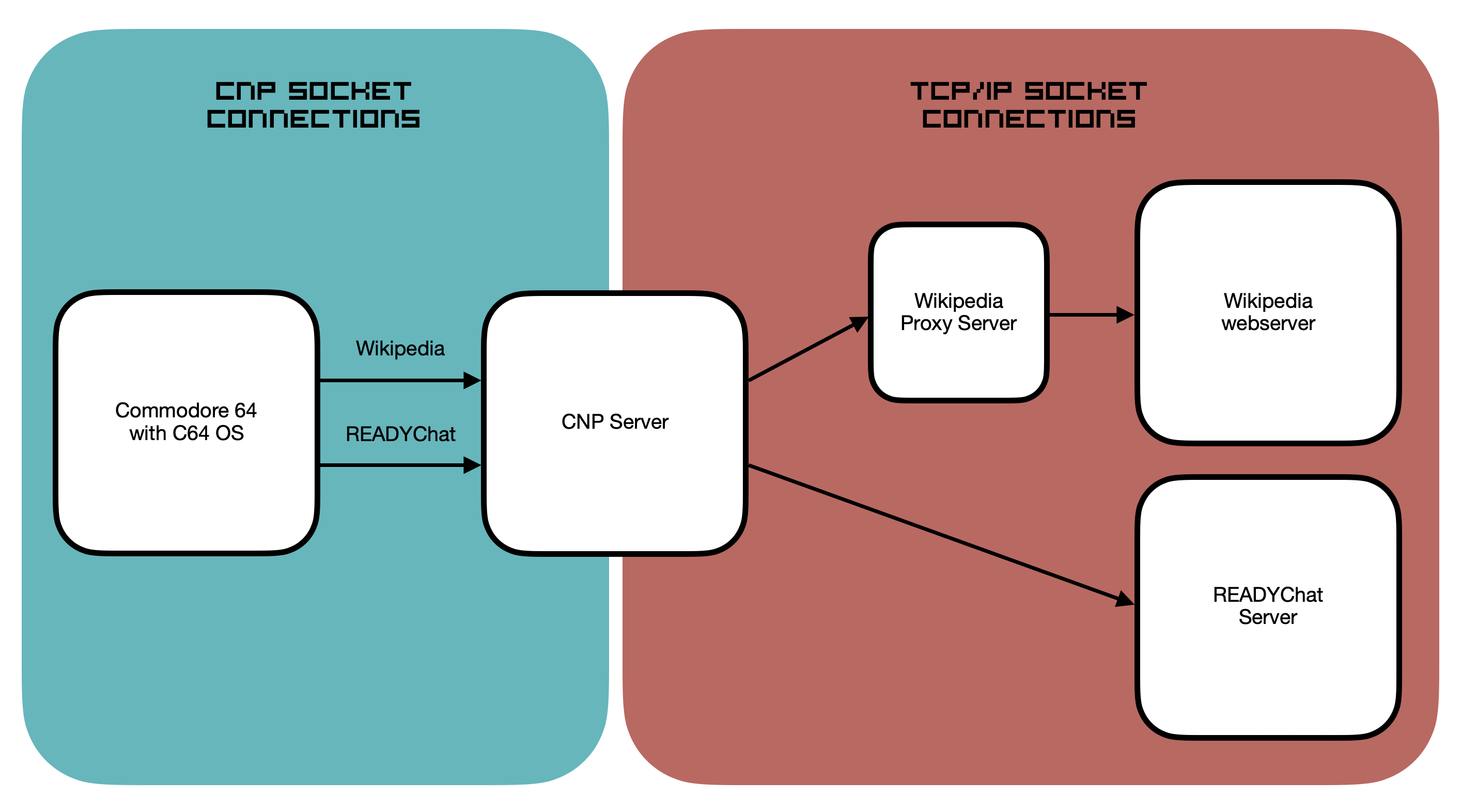
The above diagram shows the division between the CNP socket connections and the TCP/IP socket connections to which the CNP server bridges. The diagram shows that at least two socket connections are open on the C64, one for Wikipedia and one for READYChat. The C64 Network Protocol makes this possible, so that's an immediate win. The proxy server, if required at all, is entirely on the TCP/IP side of the equation.
For example, the READYChat server is a TCP/IP-based service. However, it uses a custom protocol that was written specifically to be a chat system for retro computers. It doesn't need any kind of special proxy server because it already delivers small quantities of data requested via a lightweight set of commands.
The Wikipedia webserver, on the other hand, is designed to deliver huge payloads to modern computers with gobs of memory and super fast processors. In order to interact with Wikipedia, a proxy server is used in the middle. The Wikipedia proxy server receives its input requests via a TCP/IP socket and in turn makes TCP/IP socket requests to the Wikipedia server.
The requests sent to the Wikipedia proxy server are not HTTP. They are a smaller, simpler, Wikipedia-specific set of commands, including the ability to request a table of contents or to request a section of an article by index. The Wikipedia proxy server makes an HTTP request to the Wikipedia server, downloads an entire article, and creates from that article a table of contents and many small sections. Each section is converted from HTML to MText, and each MText section and the table of contents are cached in the Wikipedia proxy server.
When the user chooses an article section from the table of contents, the request is made to the Wikipedia proxy server. It does not keep going back to the Wikipedia server with new HTTP requests and fetching massive payloads. Instead, it immediately sends back the cached MText article section. This allows the response time for requesting the next article section to be a fraction of second. And each article section is usally no more than 10 or 20 kilobytes, so it downloads in just a few seconds. The MText cached in the Wikipedia server is in ASCII. The Commodore 64 converts the ASCII/MText to PETSCII/MText in realtime as it downloads the article section. And the PETSCII/MText is natively rendered by the C64 OS TKText class.
Conclusion
The network stack in C64 OS is small and efficient; it occupies just 3 to 3.5 KB of memory, and even then only in app banks that need access to the internet. The C64 Network Protocol gives all smart network hardware devices equal footing. There is nothing, for example, that a Link232 Wifi can do that a TeensyROM can't, or vice versa.
All Applications are written to access the internet using the CNP socket API. They are never written with a requirement for any specific piece of network hardware. CNP allows up to 248 virtual data pipelines open at the same time. Each pipeline can be paused and resumed independently. Data can flow in both directions down different pipelines at the same time, by interleaving packets that segment the data streams.
A proper networking protocol and a socket API takes away most of the burden that an Application developer faces about writing for networking. This enables the development of interesting new Applications with rich, native, mouse-driven user interfaces. C64 OS already has several first-party Apps and Utilities that access the internet implicitly, with more in the pipe.
Part II of this guide took a deeper dive into the philosophy of networking in C64 OS. It covered in more detail how the C64 Network Protocol works, how the socket-based API is used and what kind of Applications we can expect from the future on C64 OS.
Part I of this guide covered the basics of what the C64 Network Protocol is, what hardware C64 OS supports, how to identify and choose the right driver, and how to configure your settings for joining an access point. It also covered how to manage your CNP access credentials and how to use them to get online. It concluded with an overview of some Apps and Utilities for C64 OS that take advantage of its networking technologies.
Part I: Getting Online
Table of Contents
This document is subject to revision updates.
Last modified: Jul 21, 2026