NEWS, EDITORIALS, REFERENCE

Digital Audio Architecture
I love digital audio. I always have. From the first time I heard that clip of "everybody was kung fu fighting" on my C64, I was enthralled. Before that I had no idea that computers were able to produce music and audio that sounded so real.
That was a long time ago. Today, the idea that computers play and edit digital audio is so obvious and omnipresent that young people, like my kids, can scarcely imagine how audio could be produced without using a computer. iPhones, iPads, iPods, AirPods, laptops, desktops, Alexa, it's digital devices all the way down. But back in the 80s when most music was on either vinyl record or magnetic tape, there was something truly magical hearing your Commodore 64 produce sampled digital music. And I know the Amiga did it better, and early Macs did digital audio too, but I personally had very little exposure to those machines.
My brief history with digital audio
Most people probably don't know this, but I am still listed in CSDb as a current member of Digital Audio Concepts. It was a group founded by Vanessa Dannenberg, whom I met on IRC and spent loads of my youth chatting with about all things C64 and digital audio. I guess I became a kind of honorary member, because in those days my skills weren't good enough to program much of anything.
CSDb says I do "that Wings OS", which is a strange attribution. To be clear, I was an advocate for WiNGs because I also love operating systems, but WiNGs was the product of Jolz Maginnis's genius. I got a reputation for it because I demoed and advocated for it pretty hard at shows in North America.
Interestingly, of my several contributions of apps and tools for WiNGs, one was a RIFF/WAVE player called Wave Player1 and one was the WiNGs Movie Player which consisted of both digital audio and video frames, synchronized. I also did some very light tinkering in assembly and extended the mono SID-digi driver for WiNGs to support stereo. So even when I was contributing to WiNGs, and mostly in C, my fascination with digital audio shone through.
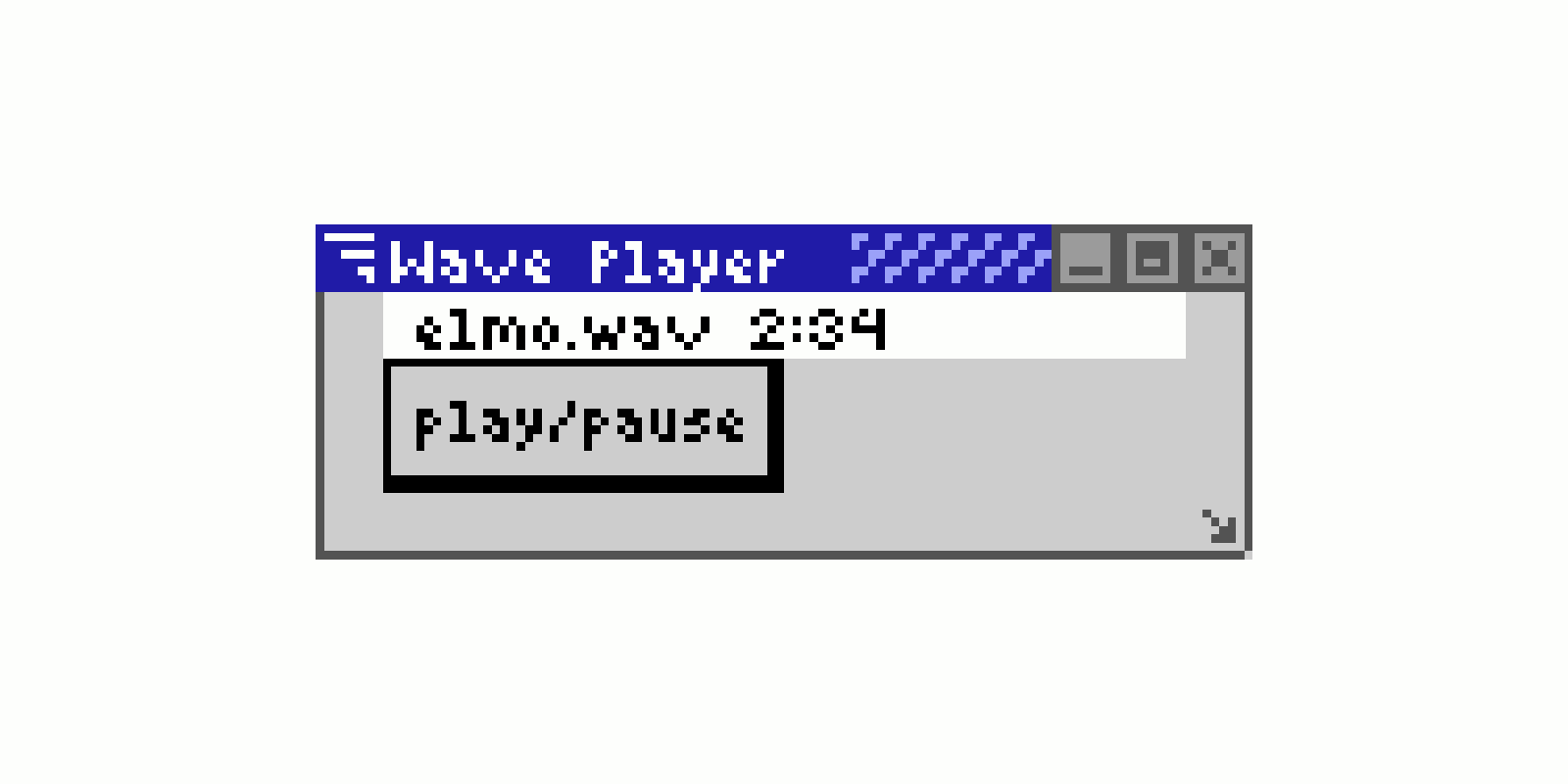
Wave Player for WiNGs
I am also credited in CSDb as "contributing" to GeoPlayer v1.0. Another interesting attribution; I never consciously contributed to that release. Rather, I wrote and blogged about GeoRAM Digi. It is a standalone RIFF/WAVE player that backends on the GEORAM. The source code with explanations is found within that blog post, and that source code got included (with credit, which the blog post encouraged,) in the GeoPlayer release. Neat.
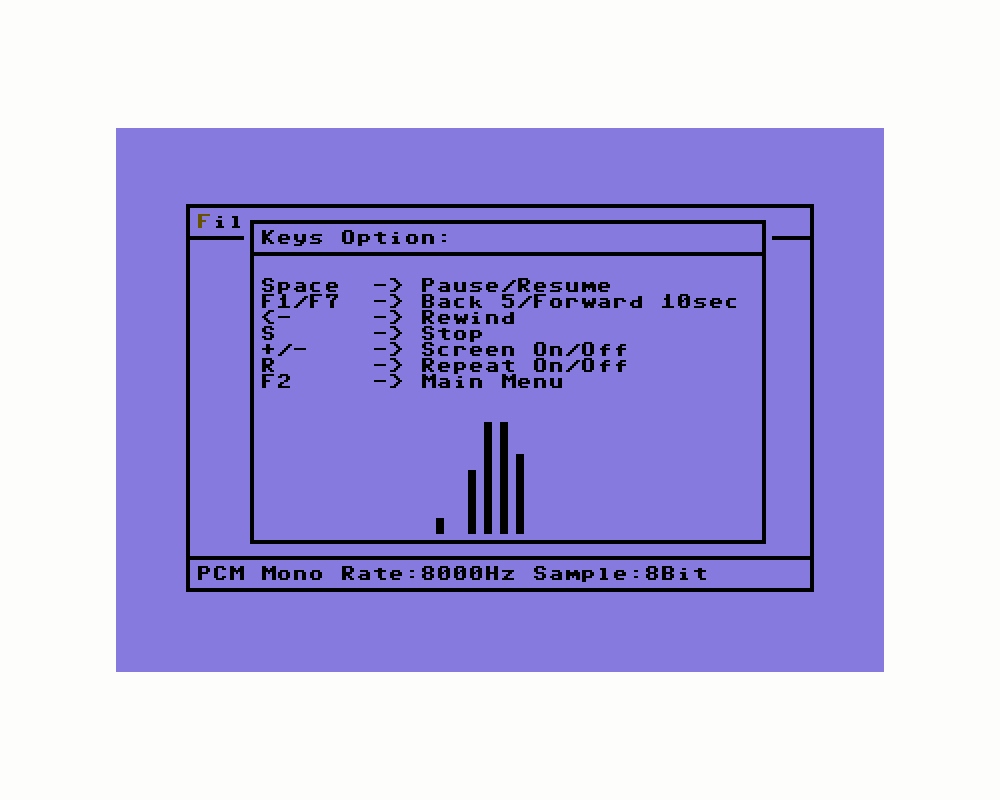
GeoPlayer, standalone for C64
All of this brings us to today. I'm currently working on a "Digital Audio Architecture" for C64 OS. And the rest of this blog post is here to explain what that's about.
Digital Audio in C64 OS
Over the years, a lot has changed about the way I write and design software. This is probably due to getting some professional experience under my belt and working on some fairly large and complex projects that I've had to support for years.
There is a big difference between banging out a one-off program that does something fun or cool, and creating a large system with many interacting parts that has to grow, evolve, and gain features, all while remaining sustainable over a long period. Having big projects like that mature a person, and get you thinking about code organization and long-term sustainability, rather than just what it takes to get the job done.
I think I can thank this attitudinal shift for the success of C64 OS. I've spent a lot of time with C64 OS focusing on how to modularize the code for reuse. This is what led to relocatable 6502 code, boot components, KERNAL modules, shared libraries, drivers, toolkit classes, loaders and savers, and the whole network stack. I want the system to be a logically organized collection of parts that plug together to make it easier and faster to make higher quality software. And so far, I think C64 OS is succeeding in this goal.
When C64 OS v1.09 was released, it came with Software Center. There is a section of Software Center for media of various kinds and specifically a section called "sounds" for downloading digital audio files. I have fond memories as a teen listening to Worf's voice saying, "Do not play games with me," coming out of my C64. Or Captain Sisko saying, "You heard me!" So cool. But, C64 OS doesn't have a way to play these audio clips. I included the section in Software Center with an initial bunch of downloadable files because my intention was to get cracking and add support for it in C64 OS shortly thereafter.
But it's got to be done right. I don't want to just port GeoRAM Digi to C64 OS, the way the GeoRAM Digi routines were stuffed into the GeoPlayer release.
An overview of GeoRAM Digi
Hey, I wrote GeoRAM Digi, so I know what it means to bang out a program for the Commodore 64 that does something fun or interesting. And I'm not opposed to that style of software development. It's fun, you learn something, you can release it, and then move on to something else. But this is not how you create a "digital audio architecture" for an operating system.
In broad strokes, let's recap what GeoRAM Digi does to get an idea for how a standalone program (Commodore 64-style) might work.
GeoRAM Digi is one file with one continuous path of execution until almost the very end. It runs from the READY prompt, it uses a BASIC routine for outputting strings to the screen and it starts with lots of string constants and variables and some structures, all inline.
Each section just keeps falling through to the next section, outputting status messages along the way, unless or until it encounters an irrecoverable error, in which case it outputs an error message and bails back to the READY prompt.
Part 1: Headers, Variables, GEORAM Detection, file access routines
First is the GEORAM detection for presence and then tests for capacity. There are a handful of reusable routines for opening a file, closing a file, and reading in lengths of bytes either to nowhere or to a specific starting address. Then there is RIFF/WAVE chunk handling. So it just falls from the GEORAM detection straight into opening a file by a default name and reading in RIFF headers. If it's not a RIFF/WAVE file it bails with an error.
Part 2: Reading format header
It checks the "fmt" chunk header, and if it has a supported format, it outputs messages about the sample rate, the sample bit size, the number of channels, the data length, etc. But if it encounters anything like an unsupported sample rate, it bails with an error message. Part of the bailing process at this point is to properly close the file first.
Part 3: Reading data, converting 16 bit to 8 bit samples
If it makes it this far, it falls into the next section that loads the data from the "data" chunk into the GEORAM. It doesn't allocate space in the GEORAM, it just starts at the beginning and assumes it has 100% ownership of it. This is very typical of C64 software. It has an 8-bit loader and 16-bit loader. So if the samples are 16-bit it branches to the loader that handles those. It converts them with dithering to 8-bit samples before storing in the GEORAM.
Part 4: Configure the NMI, set mono or stereo playback handler
Almost lastly, it configures the NMI timer for the sample rate by looking up the sample rate from a table to get an appropriate NMI timer value. The table has values for PAL and values for NTSC, that's important. And it also points the NMI hander at one of two playback routines; one is for mono and the other for stereo. Both routines only know how to output to the DigiMax and just assume the DigiMax is present.
Part 5: Loop checking for keyboard input
And lastly, it falls into an infinite loop checking for key presses. If certain keys are pressed it calls a routine per type of key. So there are some end routines that handle: play (which unmasks the CIA's timer IRQ), pause (which masks the CIA's timer IRQ). Back and forward which adjust a play index, essentially a pointer into the GEORAM. Rewind which sets the play index back to zero. Stop which pauses and rewinds in one step. And a quit feature that stops any playback, and leaves the infinite loop by bailing to the READY prompt.
Part 6: Play a sample per NMI, update playback index
While playing, the NMI fires, the play routine reads a byte or two from the GEORAM, shoves them into the DigiMax and updates the GEORAM's play index. In a tiny nutshell, that is pretty much the whole thing.
I suspect that a lot of Commodore 64 tools and utilities have this sort of workflow. The RAM expander is hardcoded. The detection routine is written from scratch. The file access is with the KERNAL + a couple of simple helper routines written from scratch, with no concept of place on the device, always just operates on the current device (or only device 8) in the current partition and directory. Supports precisely one file type (RIFF/WAVE). Supports a couple of variations, a few combos of sample rate, sample size, and channel numbers. Reads data into the GEORAM like a bull in a China shop. Takes over the NMI vector, takes over the CIA timer, and is hardcoded to output samples to the user port while assuming the presence of a DigiMax. Implements its own event loop, hardcoded to check for a set of single keypresses. Along the way, prints status messages to the screen by means of a routine in the BASIC ROM.
I mean... wow! It's harder to imagine something that is closer to the metal than this. It gets the job done, but it's a remarkably brutalist design; single-purpose, monolithic, and completely unconcerned with abstraction.
C64 OS modularity
We have several problems to address and overcome.
- Support for multiple playback devices
- Support for multiple file types
- Sharing the RAM expansion
- Playback within the OS's framework
Support for multiple playback devices
In the context of an operating system we definitely want the user to be able to take advantage of different kinds of hardware. There are several kinds of digital audio playback hardware available to the C64, but let's start with the most common.
Every C64 comes equipped with one SID chip, which is capable of mono output and mediocre but passable quality. We definitely need to support this as an option, and in fact it should be the default since every C64 can do it. Another common configuration is two SID chips. This enables stereo output, and although both have the same resolution, the combination of them may result in a subjective increase in quality. Two SIDs should be an option.
There is a small complication, however. While the first SID is always found at a fixed address, $D400, a second SID can be mapped into one of many different possible spaces. Therefore, we don't just want to support a second SID, but a second SID at any address it can be mapped to.
Much less common, but still commercially available (and supported by VICE,) is the DigiMax. I'm also proud to say that DigiMax was originally designed by Vanessa Dannenberg of the aforementioned group, Digital Audio Concepts. So all things come around. You can buy DigiMax today from Shareware Plus, and there are also some DIY PCB kits and 3D printable enclosures. DigiMax essentially connects a chip with true 8-bit DACs to the user port. Two of the user port lines are used to address the DAC, and two pairs of DACs are mixed in analog to stereo ouput. We definitely want to support this as an option.
There are likely other options too, but these three are a good start and it means we need a solution.
The solution is drivers, of course. C64 OS has drivers for mice, keyboards, realtime clocks, network hardware, and now it has drivers for digital audio output.
Hardware drivers
Every driver type has a settings file in the system settings directory
(//os/settings/). For example:
| Driver Type | Settings File |
|---|---|
| Mouse | ptr.drv.t |
| Keyboard | kbd.drv.t |
| Realtime Clock | rtc.drv.t |
The new driver type is specified in //os/settings/:dgi.drv.t and has three lines;
the driver size in pages, the filename, and options that are provided to the driver during
initialization.
How that driver is selected is a job for something else. The RTC and mouse drivers are specified (for now) using the C64 OS Configure Tool. The network hardware driver is chosen from the Network Utility. When there are more keyboard drivers, and printer drivers are added, there will likely be a Drivers Utility for choosing and customizing all of the various drivers. Until then, it is always possible to manually edit a driver settings file using Novatext or MiniEdit.
Loading the hardware driver
For some drivers it makes sense for them to stay resident in memory all the time. For example, the mouse and keyboard driver are always in memory. Other drivers are used only temporarily, like the RTC driver. All three of these are loaded as part of the boot process. Other drivers, like the network driver, are only used in certain App banks, the ones where an Application or Utility needs access to the internet. The network driver is loaded and configured by the network library which performs other network setup tasks.
A digital audio driver is more like a network driver than it is like a mouse driver. It will only be loaded into memory in a specific App bank where either the Application or Utility needs it. It would take a lot of coding effort for each App to read in and parse the digital audio driver settings file, and then use that to load and configure the driver. Additionally, if an Application and a Utility in the same bank both wanted to play digital audio then their efforts to load and install the driver would conflict.
Libraries in C64 OS are already shared, which means they already have the mechanism that increases a reference count when a process tries to load one that's already loaded, and decrements the reference count when it's unloaded. A library is only truly uninstalled when its reference count is reduced to zero.
There is, therefore, a digital audio library called dgisnd.lib.r. Loading this
library is very simple. It takes only 9 bytes of code to load a library. The library handles
reading the dgi.drv.t settings file, parsing it, loading the
specified driver, installing that into the driver table, and initializing the driver with
the options from the settings file. With the bonus, as mentioned, that if a second process
tries to load it in, both processes end up with a reference to the same library and the same
driver. When the library is unloaded, it handles uninstalling the digital audio driver for
you.
Support for multiple file types
In a program like GeoRAM Digi, it's just too much work to support multiple file types. It doesn't claim to be anything more than it is, it reads in and plays RIFF/WAVE files. Why this file format? Because it's common, it's a popular format that can be found on the internet and it's straightforward to read.
However, for the digital audio architecture of an operating system, it is not good enough that an Application has to manually support a given file format, and it's also not good enough that we should be limited to just one file format. The answer to this problem is to use datatype loaders, which we've already seen with Image Viewer.
Defining a native format
For image data, the VIC-II supports several native display formats and image file formats store the data in different ways. Sometimes with padding, sometimes with compression, sometimes with metadata, and so on. But at the other end the operating system needs to have a predictable known structure that defines the graphics properties and points to the various buffers. This defined structure is called the graphics context.
For digital audio drivers and datatype loaders, C64 OS is introducing a structure similar in theory to the graphics context though different in its details. This is called the sound context.
In addition to loading the driver, the dgisnd.lib also handles a lot of other tasks
to take that work off the shoulders of the App or Utility. The library creates an empty sound
context. Each driver has a routine that writes some basic information about the sound device
to the sound context.
A pointer to the sound context is later passed into the datatype loader and it populates it with information about the source file format.
In principle, this is similar to how the graphics context works. A pointer to the graphics context is passed to the image datatype loader and it populates the properties based on the kind of graphics data the loader supports. There are some differences though. What the VIC-II supports is pretty universal, whereas the digital audio driver supplies data to sound devices with different abilities.
There is precious little time to do realtime processing while digital audio is playing. 2 Therefore, there is some interplay between the driver and the loader, mediated by the sound context, so the loader can perform pre-processing of the data to put it in the right format for the output device. There are still limits to the range of formats considered native, so there are a limited number of combinations from loader to output format.
Defining characteristics of digital audio
All digital audio has three defining characteristics:
- Sample Rate (samples per second)
- Sample Resolution (bits per sample)
- Channels (mono, stereo, or more)
About Sample Rate
Unlike the Amiga, the C64 doesn't have any special hardware for copying digital audio sample bytes from memory to the sound device. On a C64, the CPU is required to move the data, one byte at a time. And at 1 MHz, there are very few cycles to work with.
In theory, if the software had a minimal user interface and assumed the machine always runs at exactly 1MHz, it could enter a tight and carefully timed loop doing little else but copying data from memory to the sound device and could thereby achieve a higher sample rate. This would be the audio equivalent of heavily CPU-driven graphics modes like FLI, which require the CPU to intervene so frequently that there is almost no time to do anything else.
In C64 OS, I wanted the user to be able to move the mouse, to see a button and click it to affect the flow of the software. In order to do this, the C64 OS main event loop would have to continue to run and the audio timing would be driven by an NMI generated by a CIA 2 timer.
Unfortunately, this turned out to be a lot more difficult than I had anticipated. During implementation I learned a lot about whan an REU can and cannot do, and I had to redesign how playback would work a few times. To start with, simple division can give us an accurate measure of the maximum number of CPU cycles per sample. The hard reality is that the higher the sample rate, the fewer the cycles there are to play with.
Common sample rates are, 11.025kHz, 22.050kHz, and 44.100kHz. There are also less common but useful sample rates, 4kHz, 8kHz and 16kHz. One kilohertz means 1000 audio frames per second. Before addressing sample resolution and channels, let us assume 1 frame is 1 byte. The CPU, therefore, must be interrupted by the NMI, read one byte from memory and output it to the sound device, once for every frame per second. On an NTSC C64 there are exactly 1,022,727 cycles per second, slightly over 1MHz. The CIA timer ticks once per CPU cycle (Phi 2 cycle) and can be configured with a delay number representing how frequently to generate an NMI and thus how many CPU cycles there are to work with between samples. From this we can derive the following table:
| Sample Rate | Cycles per Sample * |
|---|---|
| 11025 | 92 |
| 22050 | 46 |
| 44100 | 23 |
| 4000 | 256 |
| 8000 | 128 |
| 1600 | 64 |
* A PAL C64 runs at slightly less than 1MHz, so the numbers in the above table are slightly smaller.
We can see that as the sample rate doubles, the number of cycles available to service each frame is halved. 44.1kHz is completely impossible. Remember that the CPU requires a varying number of cycles per instruction, from 2 to ~7, let's call that an average of 4. 23 divided by 4 is fewer than 6 instructions. At 44.1kHz a 1MHz machine doesn't have time to do anything. At least, not without CPU acceleration such as a SuperCPU, Ultimate 64 Turbo, Turbo Chameleon 64, etc.
22.050kHz is also extremely tight, too tight, really. However, everything below 22.050kHz is at least within the realm of possibility.
What is the impact of sample rate? What is lost if the sample rate is not high enough?
As a sound wave is being produced, the sample rate represents how frequently the amplitude of the wave is measured. What sample rate you need in order to capture an audio signal without errors depends on the audio frequencies being sampled. There is complicated mathematical theory behind it that was worked out in the early 20th century. Roughly put, the sample rate should be at least two times the highest audio frequency. For example, ordinary human speech typically falls between 300Hz and 3.5kHz. A sample rate of 4kHz is therefore insufficient to capture speech fully, but 8kHz is much better. Orchestral music, on the other hand, ranges from 20Hz to 20kHz. To capture this, you really need 44.1kHz, but I think we'll be okay if we cannot faithfully reproduce orchestral music on our Commodore 64.
Online Tone Generator
By the way, this is pretty cool: https://onlinetonegen.com
About Sample Resolution
In addition to the frequency with which audio is sampled, there is also the resolution of each sample. How finely can the amplitude measurement of one sample be distinguished from its neighboring sample?
There are three sample resolutions that we are most likely to encounter and need to be dealt with: 4-bit, 8-bit and 16-bit. The following diagram, which I found on unison.audio, is a great visualization. The horizontal resolution is the sample rate, discussed above. The vertical resolution is the bit depth of each sample, or the sample resolution.
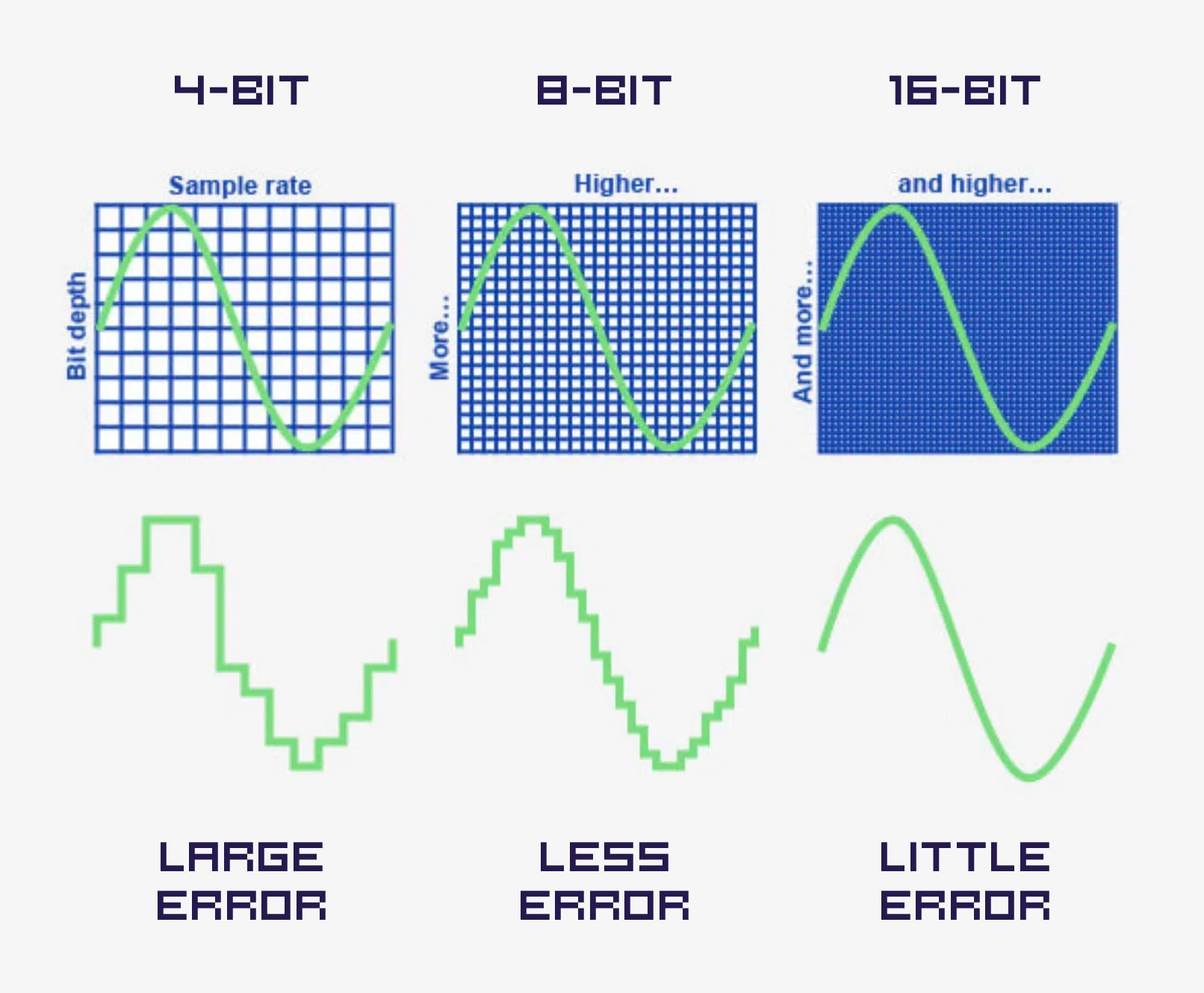
Sample Rate and Bit Depth – Original from unison.audio
As the bit depth doubles, the potential quality of each sample dramatically more than doubles. The reason for this is straightforward; the value range doubles with the addition of each individual bit. Thus, 5-bit provides double the value range of 4-bit. Therefore, 8-bit is not just double 4-bit. 8-bit affords 16 times the resolution of 4-bit! And 16-bit is not double 8-bit, it is in fact 256 times the resolution of 8-bit. And 16-bit is not merely 4 times but 4096 times the resolution of 4-bit. So each doubling of bits dramatically–nay, exponentially, increases the sample's quantization resolution. Let's see this in a table.
| Sample Resolution | Value Range |
|---|---|
| 4-bit | 0 to 15 |
| 8-bit | 0 to 255 |
| 16-bit | 0 to 65535 |
Standard audio CDs encode digital audio at a frequency of 44.1kHz and 16-bits per sample. Although some audiophiles debate the issue, this is generally considered to be high enough that most people perceive it as preserving perfect fidelity for even complex music.
The problem, of course, is that 16-bits is 2 bytes and 44.1kHz would be 44100 * 2 bytes or 88200 bytes per second of playback. A 64KB C64, with, say, 35KB of free main memory is enough to store less than half a second of playback. A 16MB REU could store about 3 minutes of audio. As we saw earlier, 44.1kHz is too fast for a 1MHz C64 to playback anyway, but this gives us some perspective.
In the wild, i.e., on the internet, we are likely to enounter digital audio files that contain either 8-bit or 16-bit samples. On the C64, we are unlikely to ever have 16-bit playback devices because the potential increase in quality is probably not worth the disk storage, the load time, the memory capacity, or the CPU requirements to push that much data around. For comparison, even the Amiga 4000's native digital audio, built around Paula, only supported 8-bit samples and a maximum frequency of around 28kHz, (although this could be increased with hardware expansion cards.)
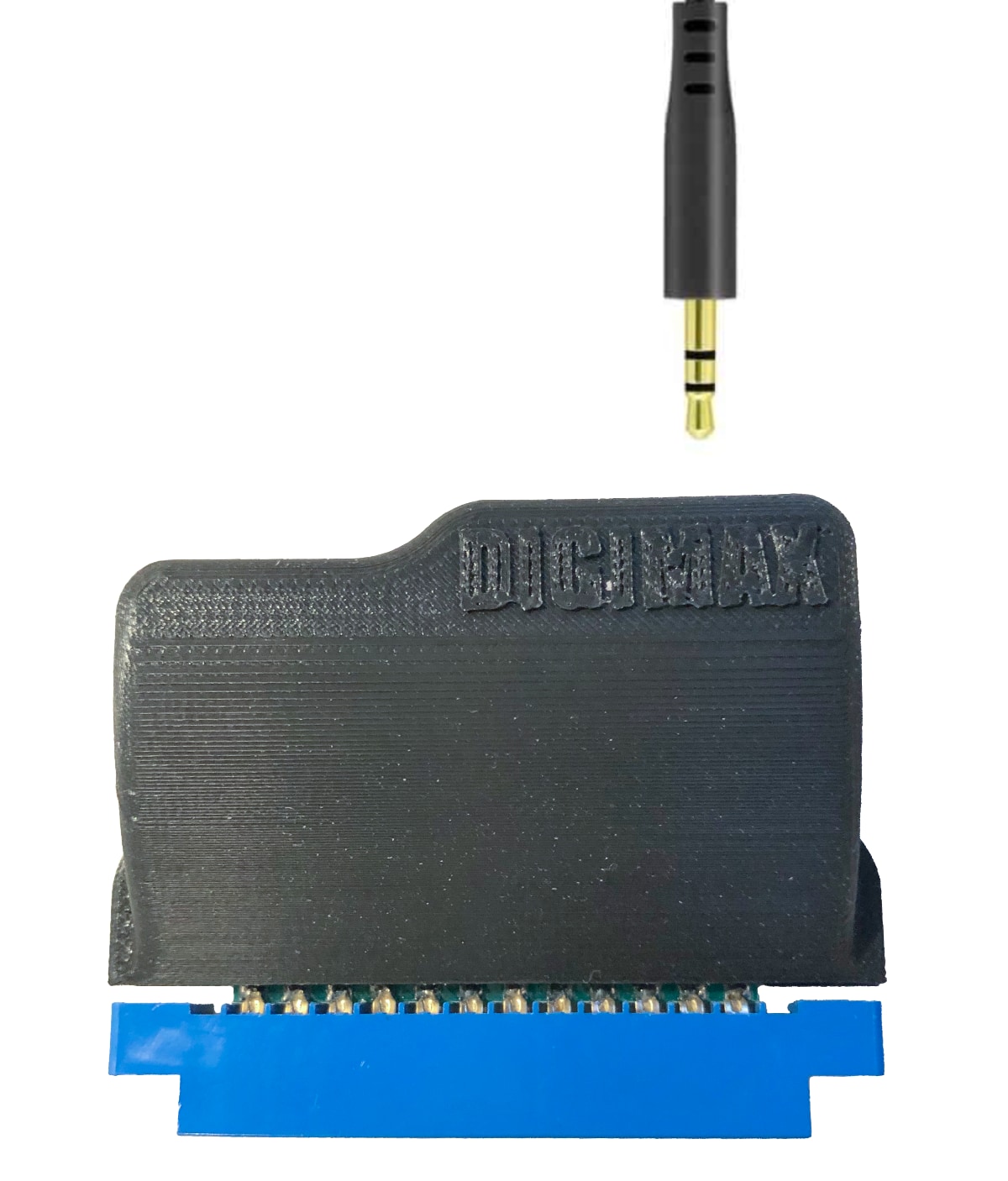
On the C64, we have the SID which supports 4-bit, and dual SIDs which support more than one channel at 4-bits each. More about channels next. The DigiMax is probably the next most popular sound device and it supports 8-bit. One interesting detail about 4-bit is that although a nybble is half the size of a byte, in practice 4-bit samples are not packed as two samples per byte. Rather, one sample still ends up taking 1 byte of memory, but the information is all in the lower half. The reason is because the 6502 is an 8-bit CPU and moves data a byte at a time. If the 4-bit samples were packed they would conserve memory at the expense of more complicated and time-consuming processing during playback. Time we don't have.
About Channels
Channels are the easiest to understand. If there is only one channel, the audio is mono. If there are 2 channels, the audio is stereo. RIFF/WAVE files can absolutely support more channels than this. There is a specification for 5.1 and 7.1 surround sound, with 6 and 8 channels respectively. But in practice files in this format are very rare and we are just going to ignore them on the C64. We will most likely never download them in the first place, but if one is encountered the loader will simply return that the file contains an unsupported format.
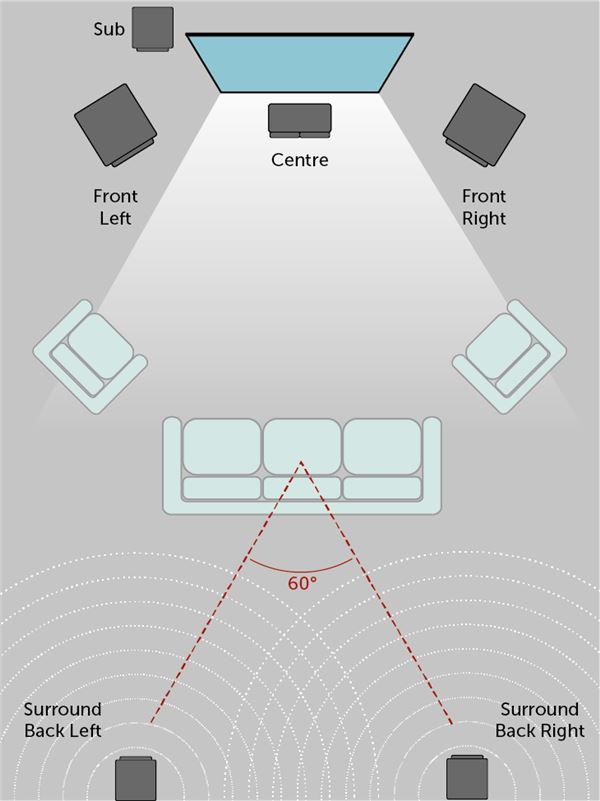
Typical 5.1 Surround Sound
Channels are not complicated to understand because it is effectively two streams of digital audio sent to either two sound devices or two selectable channels of a stereo sound device. For example, one SID is mono and can accept one channel of digital audio samples. If the C64 has two SIDs, then the dual sid audio driver can write one sample from each channel to each SID. Devices like DigiMax have stereo support in one device. The driver selects a channel before sending each sample.
Stereo data is as simple as having two chunks of digital audio data in memory at the same time. Two channels, therefore, takes up twice as much memory. It does not require two times the CPU processing, however, because during a single NMI the service routine can write out two samples and therefore the overhead is shared. There is also the issue of how the two audio channels are stored in memory. The convention is that pairs of samples are stored side-by-side, so that two channels have their samples interleaved. This arrangement makes playback easier.
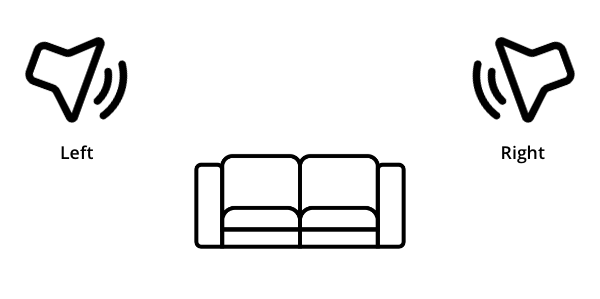
Typical Stereo Sound
If the source data is mono but the sound device is stereo (e.g., two SIDs or a DigiMax) then the driver needs to send the same sample to both output channels. This is very straightforward. If the source data is stereo but the sound device is mono (e.g., just one SID), then the two samples need to be mixed. Mixing two samples is also straightforward, it essentially consists of adding them together and dividing by two. There are some nuances that we'll talk about later, but the more important question is: to mix at load time, or to mix in real time?
Mixing at load time conserves memory and makes playback faster. But it's lossy. For instance, if you were able to switch drivers in real time, but loaded with load-time mixing while a mono driver were installed, then switching to a stereo driver the loaded data will still be mono. Alternatively, you could use the combination of a loader and a saver to convert a file between formats. For example, load a file with a RIFF/WAVE loader, then save the in-memory format to disk using an AIFF saver. If the data is mixed at load time, the in-memory representation has lost information that cannot be recovered when it comes time to save.
It's just something to consider. In practice, just for listening, converting at load time is much more efficient; playback is easier and it takes up less memory.
The native audio format
Now that we've reviewed the characteristics of digital audio and some of their considerations with respect to a C64's abilities and limitations, we should return to the idea of a native audio format.
There shouldn't be just one single native format, but a limited range of possible values that can be described by the sound context, which the loaders can convert to, and which can be realistically played back by a C64.
| Audio Trait | Native Trait or Range |
|---|---|
| Sample Rate | 4kHz, 8kHz, 11.025kHz, 16kHz |
| Sample Resolution | 4-bit (unpacked), or 8-bit |
| Channels | 1 or 2 (interleaved) |
| Integer Type | Unsigned |
| Encoding | PCM |
The job of the loader
The sound context is the grand mediator between the loader, the driver and the dgisnd library. The Application gives the user control over what happens, by providing file references to load and making calls to the library to control playback when buttons are pressed.
Initially the sound context is zeroed. The driver has been loaded and installed in memory according to the preferences of the user and the hardware available on that computer. A pointer to the sound context is passed to the driver right after it's installed. The driver writes only two details into the sound context: the number of channels the sound device supports (1 or 2), and the number of bits of sample resolution the sound device supports (4 or 8).
The loader has two phases, the metadata phase and the data phase. The first populates the sound context with all the relevant details extracted from the file's headers; the sample rate, the sample resolution, the number of channels, and the quantity of source data. The loader can also be probed for a format string. For example, the ".wav" loader could reply with, "Microsoft waveform-audio" or "WAVE (Waveform Audio)". The loader for a ".aif" file could reply with "Apple AIFF" or "Audio Interchange File Format", something like that.
The metadata phase returns with pass or fail plus an error code. For example, the ".wav" loader checks for the standard RIFF/WAVE header signature. If that signature can't be found, it returns an error code. If it's a RIFF/WAVE file, but it has 6 audio channels, or 24 bit samples, or if the data is compressed, it returns different error codes for each condition. The Application decides how to display an error to the user.
The magic happens during the data phase.
The dgisnd library computes how much space will be needed after conversion. For instance, if the source data is 16-bit, the data size is halved because it's going to be converted to 8-bit. If the source is stereo but the sound device only supports mono, the data size is halved again. The library then allocates the required banks from the REU, using C64 OS's bank allocation call (bkalloc) from the memory library. The size and location of the bank allocation are also recorded in the sound context.
Digital audio in C64 OS requires a 17xx-compatible REU. Unlike GeoRAM Digi, which required a GEORAM. More on this below.
The data phase of the loader is responsible, naturally, for loading the audio data from the file into the allocated space in the REU, but it does quite a bit more. It downsamples from 16-bit to 8-bit with dithering, or from 8-bit to 4-bit. It mixes stereo to mono. And it also converts the samples themselves. The sound devices require unsigned ints (value ranges 0 to 255). In a RIFF/WAVE, 16-bit samples are signed, little endian, but 8-bit samples are unsigned. In an AIFF, 16-bit samples are signed, big endian, and 8-bit samples are signed too. The point of the loader, then, is not only to load but to downsample and to mix according to the specifications of the driver and to convert integer types into C64 OS's native audio format. And I suppose, if there were some audio file format in which the samples were not stored interleaved, the loader would rearrange them to be interleaved in memory.
Selecting loader routines
This section is be a bit technical, but it's also really cool so I want to share how it works.
There is one dataload routine in the loader, but there are lots of possible combinations of source to target formats. Somehow it needs to figure out what to do. To start with, I created a table of all the possible combinations of inputs going up the side, and all the possible combinations of outputs along the top.
| Format Conversion Matrix |
Format for output device | ||||
|---|---|---|---|---|---|
| Mono 4-bit (1B) | Mono 8-bit (1B) | Stereo 4-bit (2B) | Stereo 8-bit (2B) | ||
| S o u r c e |
Mono 8-bit (1B) | m8m4 (0) | m8m8 (0) | m8s4 (-) | m8s8 (-) |
| Mono 16-bit (2B) | m16m4 (/2) | m16m8 (/2) | m16s4 (-) | m16s8 (-) | |
| Stereo 8-bit (2B) | s8m4 (/2) | s8m8 (/2) | s8s4 (0) | s8s8 (0) | |
| Stereo 16-bit (4B) | s16m4 (/4) | s16m8 (/4) | s16s4 (/2) | s16s8 (/2) | |
The parentheses in the table headers show how many bytes per frame. The parentheses in the table cells shows the drop in data size. Zero means no delta. Some combinations don't make any sense. For example, you can't convert a mono source to a stereo target, so those get a dash. In other words, a sound device that supports stereo also supports mono. Therefore a mono source sample stays mono, it doesn't get doubled in memory. I've shaded those boxes red.
Now we know what the possible routines are, we need to be able to pick the routines. Since the total number of combinations is 16, we need a 4-bit index to specify the routine. Even though some combinations won't get selected in practice they still need a slot in the table for the index to make sense. I started by putting them in order:
Sample Importers
| Index | Binary Index | Src Bits | Src Chans | Tgt Bits | Tgt Chans | Routine | Equivalent |
|---|---|---|---|---|---|---|---|
| (B3) 2 | (B2) 4 | (B1) 8 | (B0) 16 | ||||
| 15 | %1111 | 16 | 2 | 8 | 2 | s16s8 | m16m8 |
| 14 | %1110 | 16 | 2 | 8 | 1 | s16m8 | |
| 13 | %1101 | 16 | 2 | 4 | 2 | s16s4 | m16m4 |
| 12 | %1100 | 16 | 2 | 4 | 1 | s16m4 | |
| 11 | %1011 | 16 | 1 | 8 | 2 | m16s8 | m16m8 |
| 10 | %1010 | 16 | 1 | 8 | 1 | m16m8 | |
| 9 | %1001 | 16 | 1 | 4 | 2 | m16s4 | m16m4 |
| 8 | %1000 | 16 | 1 | 4 | 1 | m16m4 | |
| 7 | %0111 | 8 | 2 | 8 | 2 | s8s8 | m8m8 |
| 6 | %0110 | 8 | 2 | 8 | 1 | s8m8 | |
| 5 | %0101 | 8 | 2 | 4 | 2 | s8s4 | m8m4 |
| 4 | %0100 | 8 | 2 | 4 | 1 | s8m4 | |
| 3 | %0011 | 8 | 1 | 8 | 2 | m8s8 | m8m8 |
| 2 | %0010 | 8 | 1 | 8 | 1 | m8m8 | |
| 1 | %0001 | 8 | 1 | 4 | 2 | m8s4 | m8m4 |
| 0 | %0000 | 8 | 1 | 4 | 1 | m8m4 |
Divide the table in half. (There are 2 halves.)
The upper half has B3 set → source is 16-bit.
The lower half has B3 clr → source is 8-bit.
Divide the groups in half again. (There are 4 quarters.)
The upper half has B2 set → source is stereo.
The lower half has B2 clr → source is mono.
Divide the groups in half again. (There are 8 eighths.)
The upper half has B1 set → target is 8-bit.
The lower half has B1 clr → target is 4-bit.
Divide the groups in half one last time. (There are 16 sixteenths.)
The upper half has B0 set → target is stereo.
The lower half has B0 clr → target is mono.
To build an index we just have to answer each question and roll the binary answer onto a register. You cannot roll the X or Y registers, only the accumulator. And when you ROL A, all the bits shift left one position, and the value of the carry comes into position zero (the rightmost bit.) Therefore, we have to ask the B3 question first, which will march leftward with each roll until it settles into its place.
When you compare a register to memory, if the register value is less than the memory value the carry clears. If the register is equal or greater than the memory value the carry sets. In pseudo assembly code then, it would go something like this:
Reading the actual values from the sound context is slightly more complicated, but this essential idea is really cool. Get the source bits from the sound context and compare it to 16. If it's equal to 16 the carry is set. Then by simply rolling the accumulator left, the answer to that question gets rolled in. Keep asking questions until you have a 4-bit index.
Next, how do you actually use that index? By building an indexable table of pointers to the routines. Like this:
That is so cool. Figuring that out was deeply satisfying. (I did not use AI to figure this out. The fun part is figuring this stuff out for yourself!)
Reducing the sample importers
First up, m8s4, m8s8, m16s4 and m16s8 don't need to be implemented at all. If the source data is mono but the device supports stereo and mono, then the mono data is kept mono. Therefore, you can see in the table above there is an equivalent column.
 m8s4 →  m8m4
 m8s8 →  m8m8
m16s4 → m16m4
m16s8 → m16m8
That eliminates 4 of the 16 routines. There is one other kind of equivalence; as long as the bits-to-bits conversion is the same, it actually doesn't matter if they're stereo, it's exactly the same as the same bits-to-bits conversion in mono. Because the conversion goes like this:
16M → 8M (Sample 1)
16M → 8M (Sample 2)
16M → 8M (Sample 3)
16M → 8M (Sample 4)

...is processed identically to:

16L → 8L (Sample 1)
16R → 8R (Sample 2)
16L → 8L (Sample 3)
16R → 8R (Sample 4)

Similarly:

8M → 4M (Sample 1)
8M → 4M (Sample 2)
8M → 4M (Sample 3)
8M → 4M (Sample 4)

...is processed identically to:

8L → 4L (Sample 1)
8R → 4R (Sample 2)
8L → 4L (Sample 3)
8R → 4R (Sample 4)

... and so on.
The fact that the sample is a mono sample, or a left sample, or a right sample, doesn't matter. (If you're mixing two channels down to mono, that's a different story.) This eliminates 4 more of the 16 routines. We're left with just 8 routines.
I will not go into the details of how those 8 routines are implemented, as it goes beyond the scope of this article, and we still have lots of other stuff to cover. But this is how the sample importing routines are selected. Inside these routines the specifics of the source file format need to be worked out. For example, RIFF/WAVE's with 16-bit samples are signed and little endian. So it needs to reduce to 8-bit (or 4-bit) taking endianness into account and also convert to unsigned. Whereas, AIFF's with 16-bit samples are signed and big endian. The import routine does the same thing but handles the big endian byte order.
The whole point of datatype loaders is to handle all this stuff, so that your application doesn't have to worry about it. Not even the dgisnd library has to care how the bytes are stored in the file. Want to support a new format? How about .SND (SUN Microsystems) or .AU (NeXT) or .SVX8 (Amiga)? No problem, we just write a loader for one of these and our digital audio architecture can then open and play those files.
The audio playback engine
I've learned a ton about how the REU works. After implementing Fast App Switching I thought I understood the REU. But there are whole technical areas about how it works that fast app switching doesn't even touch.
As mentioned earlier, I ended up redesigning the playback engine about 4 times before I finally got it working reliably. I think it will be instructive to explain the pitfalls I encountered and the ways I tried to overcome them.
REU auto-incrememt
A few years ago, a certain demo coder I won't name said something in an IRC chat that stuck with me. I've held this idea in my back pocket literally for years and I finally decided to try to implement it. This is not the first time that following the advice of a demo coder has led me astray and I ended up wasting a lot of time.
Demo coding is all about "tricks." And tricks are all about controlling the environment in ways that are not obvious to the observer. I actually rather enjoy seeing how street magic tricks are done. And it is just as fun to see someone like LFT (a.k.a. Linus Akesson) explain how a demo, such as "Nine", does what it does.
If you haven't seen this video explanation, give it a watch, it's so great!
But the goals of an operating system are totally different from that of a demo. It's not about tricks, it's about doing practical things. One of an OS's main goals is to help unify an experience when the hardware environment is anything but controlled. As soon as you leave that controlled environment, you pretty much can't depend on anything that tricks depend on.
First, what is the trick? The REU has an address control register that Fast App Switching doesn't use at all. The modes are set with the high two bits of register $0A.
| Bits | Mode |
|---|---|
| 00 | Increment both addresses (default) |
| 01 | Fix REU addresses |
| 10 | Fix Computer addresses |
| 11 | Fix both addresses |
The idea is to set the computer's address to, say, the SID chip's volume register, which is used for producing SID-chip-based digis. Then set the REU's starting address and configure the address control so the computer's address is fixed and the REU's increments. Then you set the transfer length to 1 byte and use some method of triggering transfers at a regular interval. How you would integrate that timing into a demo, I have no idea. But the point is, the REU keeps track of its own internal memory index, which increments after each transfer while the computer's address is held fixed. So you just call: trigger, trigger, trigger, and the REC chip DMA's the next byte from expanded memory to the same SID register, over and over and over.
That trick sounds great! So I implemented it.
The implementation was like this: The Application (or the Utility, or the dgisnd.lib) sets up the REU's registers and sets up a CIA 2 timer to generate an NMI at the correct rate for the sample rate of the data. The driver configures itself as the NMI handler. Each time the NMI fires, the driver triggers a transfer from the REU.
In order for the driver to actually be driving something, it is the driver's responsibility to set up the REU's addresses. When the driver configures itself as the NMI handler it configure's the REU's computer address. A SID driver would set that address to the SID's volume register, while a DigiMax driver would set that address to CIA 2 to write data out the user port, and so on.
The first problem: Mono data and stereo devices
Before even getting into anything too technical, there is a problem that's easy to understand. The trick supposes that you've got mono data in memory and you're writing to a mono sound device like a single SID. This is, afterall, what a demo would target. If you have stereo data things become more complicated.
Take the DigiMax as an example of a stereo device. It has one memory address to write the data to, and a different register to change which DAC is addressed. The driver would point the REU to write to the same address every time. On each NMI, the driver would trigger an REU transfer, then change the DAC address to the other channel, trigger another REU transfer, and change the DAC address back to the first channel in preparation for the next NMI. SID chips, on the other hand, are two totally different sound devices on different addresses working in concert. The driver would write the SID 1's address to the REU, trigger a transfer, write the SID 2's address to the REU, and trigger another transfer. That should work.
The problem is, what happens when the audio data is mono, but you have a stereo output device or devices. Each trigger from the REU takes the data directly from expanded memory and writes it to one of the two channels. That byte is now lost, and we don't have it to write to the second channel. This isn't a show stopper, but it illustrates why the demo trick is already an imperfect solution. In this case, we need the REU to write to main memory. Then we load that byte from memory and write to channel 1, do whatever needs to be done to switch channel targeting, read the byte from main memory again and write to channel 2. It works, but remember, this starts to take time. And the point of that direct REU to sound device trick was to shave precious cycles from the processing of each frame.
The second problem: REU sharing
The next problem I encountered should have made me rethink this whole approach. C64 OS uses the REU to accelerate screen redrawing. But the audio playback depends on the REU's internal registers keeping track of where it is and where data is going. The moment anything needs to be redrawn to screen, the screen.reu.o KERNAL module makes calls to the REU to move screen data. This blows away whatever is happening with the audio, and as the NMI continues to fire, suddenly, it is just playing noise.
I tried to overcome this by thinking, well, even if we heard the audio skip when the screen gets redrawn, the screen drawing routine could read the REU's current registers and restore them afterwards. This turns out to not work, because you cannot read all those registers back. But let's hold on to that one for just a second. Instead of actually thinking through the consequences of this, I went to my C64 OS modules.t file and forced it to use the screen.cpu.o KERNAL module. Even though the REU is detected and available for things like fast app switching, and Image Viewer animations, etc., it won't use the REU for screen refreshes.
This was the moment that blew my mind. Without the screen redraws interfering with the REU, the technique actually worked! Not only that, but I was able to drag the window around the screen, shade and unshade the window, and even pop open menus, or drag the splitter in File Manager while audio was being played by the Utility. It was really quite impressive, I've never seen a C64 (without a SuperCPU) do something like this before. It was obvious that a lot of CPU time was being spent servicing the audio; a dragged window moved slowly, the menus were pokey, but it was doing it! And I could use my mouse to click the skip buttons and the pause button... and that's when the third problem became apparent.
The third problem: reading back REU registers
I had already bumped into this issue when I experimented with having the screen redrawing routines backup and restore the REU registers. But it didn't dawn on me that I would need to read the REU registers when the audio is skipped or paused. This is how the software knows where in the audio data the user got to. When you click play, you've got to know where to resume from.
To pause, you could just stop the CIA from generating NMIs and leave the REU in its current state; click play and resume the NMIs like nothing happened. But what I really wanted to do was let the user skip backwards and forwards in, say, 10 second increments. To do this, I absolutely have to know where in the audio data we got to, then adjust that address, and write it back to the REU to continue from a different spot. Of course, none of this is anything that a demo coder needs to worry about. If a demo wants to blast some digital sample data at the SID from the REU, it can hard code the addresses of the various samples. It can play a sample to its conclusion before adjusting the position to play a different one, like MOD music but with the sequencing programmed into the demo. Meanwhile, our needs immediately violate the controlled environment. The user can pause at any time. The user can resume, or skip back or forward as they please.
That's not the only use for reading back the registers. You also need to know when to stop playing because you've hit the end of the buffer. The first implementation calculated what the end REU address would be. And during playback, the plan was to compare the REU's current address against the computed end address. But this ultimately isn't feasible.
Why can't you read all REU registers?
This is an aside, but it's technically and historically fascinating. Below is page 25 from the User's Guide for the CMD 1750/1750XL REUs. This is the table that shows all the REC chip's registers and a description of what every bit does.
(Regarding the DMA direct to I/O, you can see the Address Control Register at $DF0A. That's $0A in the REC chip, which is mapped in the standard REU cartridge so that it appears in the I/O2 block, $DFxx.)
Most of the registers are shown to be both read and write with a few exceptions. The status register is read only, no big deal. But look at $DF06, the REU's bank address. Bits 0, 1 and 2 can be read back, but bits 3 and 4, which were added for the CMD 1750XL can be written but always read back as zeros. Why is that?
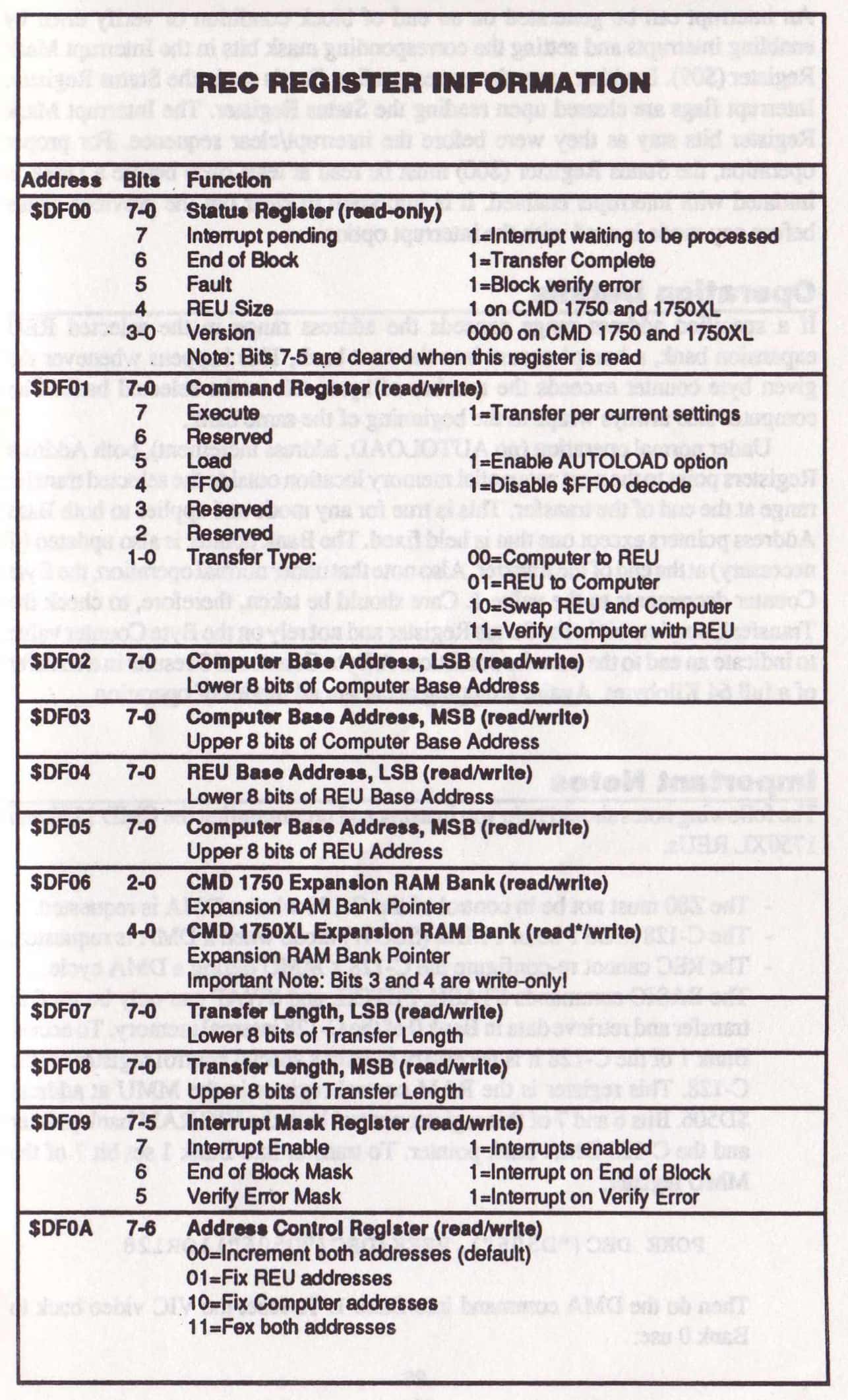
REC chip registers3 — Download complete: CMD 1750/1750XL REU User's Guide (PDF, 11.5MB)
On a modern REU, which maxes out at 16MB, it's easiest to think of the computer as having a 16-bit (2-byte) address and the REU as having a 24-bit (3-byte) address. With one extra addressing byte the REU can have up to 256 times the amount of memory as the computer. The manual insists this should be considered a bank pointer. I've always thought of this as unnecessarily confusing, but there is some sense behind it.
When Commodore first announced the REUs, alongside the Commoodore 128, there were two models: 1700 with 128KB and 1750 with 512KB. Later, Commodore released their last REU, the 1764 with 256KB. That number scheme seems weird, but the "64" was meant to imply that it was designed specifically for the Commodore 64. At the heart of the REU is the RAM Expansion Controller (REC) chip, the MOS 8726. From a programming perspective, the 1750 model has 8 banks of 64KB each. In order to address each of 8 banks you need 3 bank bits.
| $DF06 Bank Bits | Bank # | Total Additional Memory |
|---|---|---|
| 000 | 0 | 64KB |
| 001 | 1 | 128KB |
| 010 | 2 | 192KB |
| 011 | 3 | 256KB |
| 100 | 4 | 320KB |
| 101 | 5 | 384KB |
| 110 | 6 | 448KB |
| 111 | 7 | 512KB |
The important part is that internally the REC chip only has the ability to address 512KB. It has an internal 3-bit bank counter and externally it addresses a set of 8 times 256 kilobit RAM chips (U2 through U9, see below) using patterns on the RAS and CAS lines. However, the chip actually has two sets of these lines, RAS0/CAS0 and RAS1/CAS1. The second set RAS/CAS lines are used to address a second set of 8 RAM chips (U10 through U17.)
It took me a while to find the pinout for the MOS 8726, but I found it in a service manual for the 1764/1750 REUs. You can see it has pins RAS0, RAS1, CAS0 and CAS1 from pins 59 to 62.
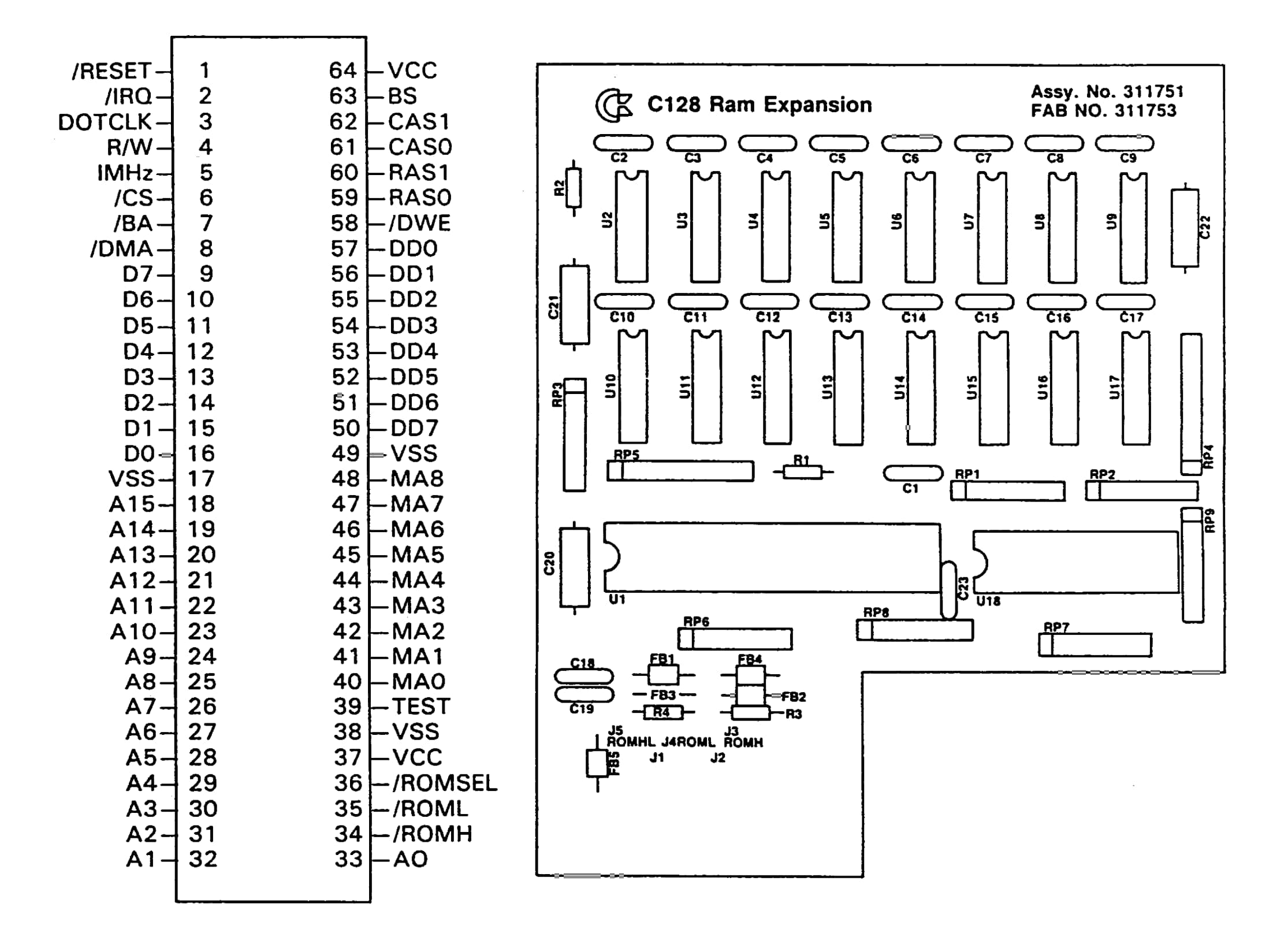
MOS 8726, REC chip pinout — Download complete: Commodore 1764/1750 REU Service Manual (PDF, 2.5MB)
By what is essentially a hack, the means to expand an REU beyond 512KB has been known for a long time. An extra set of logic chips can be used to latch the higher bits of the $DF06 register on write. These logic chips are used to change which set of RAM chips the REC lines reach. This "hack" is precisely what was built into the CMD 1750XL 2MB REU. It has 4 sets of 512KB and a custom logic chip that latch writes to bits 3 and 4 of $DF06 and switch which of those 512KB is controlled by the REC.
In an ideal world, someone would have re-engineered the MOS 8726 to be capable of fully controlling 16MB of memory. Even more could be addressed if an extra bank register were used, but 16MB is the maximum if all 8-bits of $DF06 are used for bank selection. However, designing and manufacturing a whole new chip was either beyond the abilities of CMD or beyond what would have been financially viable for the time.
Here's the catch. Reading the values back is more complicated, electrically, than writing them in the first place. When a value is written to $DF06, the extra bank-selection logic can latch the additional bits at the same time that the REC receives the byte and stores its own three bank bits. But when $DF06 is read, the REC drives its register value onto the data bus, with the upper bits reading back as zeroes. To return the complete 8-bit value, additional logic would have to combine the REC's register read with the bits stored in the external bank-selection logic and drive the resulting byte onto the data bus. That's much more complicated and doing so probably wasn't considered to be worth the extra cost and board space.
Consequently, the User's Guide just documents the shortcoming by saying, only the low 3 bits can be read. This behavior was then maintained by all subsequent REU implementations, even emulated ones that, technically, could have easily overcome this hardware limitation. I.e., VICE's 16MB REU only lets you read back the low 3 bits. The Ultimate II+, the Ultimate 64 and the C64 Ultimate, they all also only let you read back the low 3 bits, even though none of these is using a real physical REC chip.
The fourth problem: from register increment to jiffy clock
Okay, so we can't read the registers back. The user presses the button to skip ahead 10 seconds, how do we know what new address to write to the REU?
It seemed to me that there isn't much alternative than to store the playback address in main memory, and increment it on each NMI. At least we don't have to write the address to the REU because it's auto-incremementing. I implemented this, and the problem is, it just takes too much bloody time. There are so few cycles available between samples, at say 11kHz, that there just isn't the time! The whole point of letting the REU do the incrementing was precisely so that we wouldn't have to do this ourselves.
Then I hit upon a good idea. It's not necessary to know precisely, down to the very byte, where we are in the playback. We could track where we are at a much lower resolution, and when the user pauses and resumes or skips, we could apply the transformation to the low resolution time signature and translate that back into an approximate REU address; you'd never hear the difference. To do this, I used the JiffyClock. It increments three bytes, but only once per IRQ 60 times per second (50 times per second on PAL). When playing from the start, I zero the JiffyClock. When the user hits pause, I latch the JiffyClock by copying its three bytes to some variables. To skip, I adjust the JiffyClock, and when pressing play again convert the latched JiffyClock to an REU address based on the data's bytes per second (twice as many for stereo, essentially.) And then write the latched values back to the real JiffyClock and resume playback.
It worked! It really worked. The only difficulty I had was that, at the end it was sometimes slightly inaccurate about when to stop playing. Because now, instead of using the REU's address for the stop point, I calculated JiffyClock stop time. It was leading to a very subtle but perceptible clipping of the last syllable of spoken words. After some playing around I mostly worked around that problem. Such as by letting it play a tiny fraction over, and clearing that memory in the overflow. And it worked. So, problems solved right? Yeah, no, not even close.
The fifth problem: bank wrap around
Honestly, I should have known that this was going to happen, but I didn't think about it until after I'd already implemented the JiffyClock solution above.
The REU provides us 16MB, minus a little bit taken up at the start for C64 OS workspace and Fast App Switching banks. The real test is to play back a HUGE audio clip. I wanted to be able to listen to minutes of audio. I tried one of my favorite scenes from Daredevil, the one where he's talking to Frank Castle in the basement hideout. This one:
The clip is just a few seconds short of 5 minutes, and it's a brilliant scene. I downloaded it, ripped the audio track and converted to a .WAV file. Loading it takes forever over the IEC bus, but man is it worth the wait. I'm listening away, enjoying the moment, ... and all of a sudden, it skips. Instead of playing all the way through, at a certain moment, it skips back and starts replaying an earlier section. But then if I pause, and then resume, it resumes from where it's supposed to resume from. But then, a little while later, it skips back again to somewhere else. What's happening?
The problem is, the REU's auto-increment feature is only capable of auto-incrementing through its own internal 3-bit counter. Of course, naturally, the REC chip knows nothing about the extra bank logic. In other words, the REC's auto-increment feature can only roll through 512 kilobytes before it wraps around to the start of those same 512KB. By pausing and resuming, the code was computing where the REU should be, and then writing that new address afresh, which latches the new bank address. But when it hits the end of the 512KB again, it wraps around, but the external latching is still in place, so this time it's wrapping back to a different spot.
All this work, and I should have known that what I was asking it to do was just impossible. I didn't really understand how the REC works, and how the extra banks were addressed, until I actually tried to use them like this. Being limited to 512KB of audio data is an absolute kill shot. Let's do the math.
512KB * 1024 = 524,288 bytes
524,288 / 8000 bytes per second = 65.5 seconds
8000 bytes per second is 8kHz mono (crappier than 11kHz.) At this minimally acceptable data rate, 512KB is only enough for 1 minute 5.5 seconds of playback. That Frank Castle and Daredevil scene is 4.4 times longer than 512KB. Not good enough. Now what? It's like I'm back to the drawing board. And by the way, all this time, I never resolved the issue of the REU's registers getting blown away by a screen refresh, so there's still that problem.
Don't do what demo coders do. Do what your people do.4
That's really the lesson here. Unless you're writing a demo, don't do what demo coders suggest. It would be like, if you needed to invest your money to try to grow it, and a street magician says, no no no, first show the crowd a quarter, then palm it to make it disappear. Then make it look like you've pulled it from behind his ear, but while you're doing that, grab another one from your pocket, and at the end, slam your hand down and reveal two quarters. See? One turned into none turned into two. Yeah, but it's a trick. This is not how you double your money in reality.
That's the point. Many techniques that demo coders use are tricks. They're not generalizable solutions to tough but mundane problems. I need a completely different approach.
Vanessa Dannenberg wrote ModPlay64. ModPlay64 is an amazing and underrated accomplishment. It plays real Amiga Mod files on a regular C64 + REU. The question is, how does it do this? It has to play back audio from the REU, but it also has to pull samples from different REU addresses and mix samples from multiple channels together in realtime. It seems almost impossible. So how does it do it? The source code is available on GitLab, and she's still working on it. There are commits within the last few days of this writing, so the project is still receiving updates.
I read through a bunch of that source code, but I can't claim to actually understand how it all works. One thing to note, it has different maximum sample rates based on the speeds of multiple target system configurations. Naturally, a C128 at 2MHz has a lot more breathing room than a C64 at 1MHz. And a SuperCPU at 20MHz has so much time you can basically do whatever you want. This why Wave Player for WiNGs was so easy, because WiNGs requires a SuperCPU. You could obtain other sample rates from a 4MHz accelerator, or the various turbo speeds of an Ultimate64 or TurboChameleon64.
My goals are not as ambitious. I want a solid 11kHz stereo from a C64 at 1MHz, and I want to have continuous playback that is as long as REU memory is big. And I want to be able to pause and resume, and skip backwards and forwards. But I don't need realtime mixing, nor do I need sequencing of short samples, nor do I need to change the playback properties of the samples in realtime. So, at its core, how does ModPlay do playback?
It uses a playback buffer whose size has been carefully chosen to balance playback time against reload time. What does that mean exactly? When the REU is performing a transfer, it uses DMA. DMA halts the CPU and reads and writes main memory directly. But the CPU is used to send data to the sound device at a fixed regular interval. If you have 90 cycles between the output of two samples, and you ask the REU to transfer, say, 128 bytes, then the REU will still be transfering when the NMI fires. The CPU is halted and unable to service the NMI, and you'll hear this as audible distortion. 128 bytes is too large of a chunk to ask the REU to transfer at one time.
The model that I'd been using was to have the REU transfer only 1 byte at a time. Set the target, trigger the REU, and it transfers just one byte. Next NMI you repeat and it transfers just 1 byte (or 1 byte at a time, twice per NMI for stereo.) The problem with this is that you need to keep track of where the REU is, and write the REU's source address, but you have to do that inside every NMI, and there isn't enough time for that. The solution is to have the REU transfer a small amount of data, small enough that it completes before the next NMI fires. This way the number of times you need to update the REU's source address is divided by the number of bytes that get transferred in one go. One possible buffer size is 16 bytes.
Using a 16-byte buffer
The 16-byte buffer is at a fixed address range in main memory. It's going to be accessed frequently, so the ideal place for it is in zero page, which takes less time to access. All drivers then play only from that 16-byte buffer. To do this, they need an index, which is also stored in zero page. Each time the NMI calls the driver's playback routine, the driver will load the index into the X register, read a byte from buffer,x output it, then increment the index register. If the data is stereo, it can do this twice per NMI and write the new index back to zero page at the end of each NMI.
Let's say we have 90 cycles per NMI, and it takes 65 cycles to handle one NMI, that leaves just 25 cycles per NMI of idle time. But the buffer is 16 bytes long, so we actually get 25 * 16 or 400 cycles of idle time before the buffer needs to be refreshed. Immediately after filling the buffer, we spend the first so many of those 400 cycles preparing the next REU source address. Then we start checking the zero page buffer index. When the buffer index is very close to the end, like 15, we write the new address to the REU and go into a dead loop waiting for the index to become 16. The instant it becomes 16, we trigger the REU transfer which refills the 16-byte buffer, then reset the buffer index back to zero. All that can be done before the next NMI. And then 400 idle cycles starts all over again.
Some of those 400 cycles are spent transfering the 16 bytes from the REU, but that's a perfectly reasonable way to spend some of those cycles. Some of them are spent calculating the next REU source address, some are spent checking if we've hit the end of the buffer. 400 cycles is more than enough to do all this. The question is, is it enough to process the C64 OS main event loop?
The main event loop
The first audio architecture was implemented like this:
- Disable the screen refresh's use of the REU.
- Use the REU's internal incrementing address pointer.
- In the NMI trigger the REU's DMA.
- The REU's DMA directly transfers one byte to the sound device.
Under the above conditions, the C64 OS main event loop could continue to fire, and almost like magic you could use your mouse to move the Utility window around, or open menus, or resize a split view in File Manager, or reorder the list of files, all while the audio was playing back without any skipping. It was amazing! (That's the demo trick for you!)
Even under those conditions, which were problematic for all the other reasons, there were still more problems. For example, attempting to do anything that causes disk access would lock up the computer instantly. Doing rapid fire NMIs and many thousands of DMAs per second is totally incompatible with the timing required for disk access. Could a demo synchronize NMIs and DMAs with disk access? Probably, yes, but we don't need to rehash why that isn't going to be possible in a generalized environment.
While audio is playing back, moving a window or opening menus is very sluggish, the audio playback was consuming like 75% of the CPU time. Moving a window operates as if normal but running at only 0.25 MHz. Hitting the disk causes a fatal lock up, so somehow we'd have to protect against that, maybe by making the Utility modal while audio plays. What, then, is the mouse being used for? To click one of 4 buttons: Skip back, Skip forward, Pause, or close the Utility.
However, all of this is academic because that technique was unworkable. What about under the 16-byte buffer technique? The NMIs continue to fire, but now, playback is happening out of a very short buffer. How short? 11kHz mono is 11025 samples per second, divided by 16 means the buffer lasts for 1/689th of a second. It's a very short buffer.
It's not the NMI that triggers the refreshing of the buffer, it's the main program loop that runs when the NMI is not running. The main loop needs to watch carefully for the buffer index to reach 15, then do some last moment updates, then wait for the index to become 16, trigger the buffer refresh immediately and reset the index to 0 so that the very next NMI will get the first byte from fresh buffer contents.
The C64 OS main event loop looks for queued mouse and keyboard events, then sends them off to be processed which could involve propagating events through a toolkit UI hierarchy. What's more, in order for the main event loop to have events to process, it has to be interrupted by the IRQ. The IRQ only fires 60 times a second, but at a minimum it has to run the mouse and keyboard drivers, queue mouse and keyboard events, update the menu bar clock, increment the jiffy clock, and check if there are timers to service.
There is no possible way that all of this can be run and also have precision timing over when the playback buffer index hits 16 and it needs a refresh.
The playback event loop
It is still surprising to me exactly what was required to make all this work. In GeoRAM Digi, after the audio data is loaded, it goes into a very simple keyboard scanning routine. It checks the keyboard buffer, processes any key presses, loops, and thats it. The architecture was also different because of how GEORAM works. Changing GEORAM banks is very fast, and provides the playback routine a fresh 256-byte buffer virtually instantaneously. It is so fast and easy to switch banks that it did so inside the NMI handler. When it reaches the end of the 256-byte buffer, it switches banks. To have time to do this, it only had to not play one out of every 256 audio samples, which is inaudible, practically speaking.
In GeoRAM Digi, because banks are switched by the NMI handler, the KERNAL's regular IRQ handler can run like normal. It doesn't matter how long it takes to scan the keyboard nor process key events, the NMI interrupts when it needs to and the NMI does everything necessary to keep playing.
Here's what I did, in the end, for C64 OS. All of this is in the dgisnd.lib too. When you call play, by say clicking the play button, the play routine doesn't return. It masks the IRQs, it backs up the state of CIA1's ports, and it goes into a very precise loop:
- Trigger the REU to copy into the 16-byte buffer.
- Zero the buffer index.
- Increment the REU playback address by 16.
- Compare the new address to the audio data's end address, if it's greater exit the loop.
- Scan CIA1's port B, if the value is not $FF exit the loop.
- Check buffer index, if it's less than 15 loop back to scan CIA1 again.
- Write the new REU address to the REU.
- Check the buffer index, dead loop until it's 16, then loop back up to the top.
This is the whole thing. Before going into this loop, the driver is initialized, the IRQs are stopped, the CIA1 is is configured for key scanning, the NMI is configured and enabled. After leaving this loop, the driver is told to clean up and the NMIs are disabled. The CIA1's ports are restored and the IRQs are unmasked. Then finally, the play routine returns to the code that called it.
After all that, believe it or not, there was still one more problem. This worked beautifully for playing 8kHz samples, but 11kHz samples still sounded like crap. What could possibly by going wrong? The timing is incredibly precise, I'm counting the CPU cycles, everything has enough time to run, the buffer should be refreshed, the index should be reset, yet, it still sounds like crap.
I forgot about the VIC-II's badlines. The timing is so tight on 11kHz that the badlines, which happen 12,000 times per second (10,000/sec on PAL) approximately every 8th rasterline, interfere with the playback and it becomes audible noisy distortion. So, lastly, the play routine turns off the VIC-II's screen and sprites if the sample rate is 11kHz, then restores them at the end of playback. And finally, 11kHz sounds good.
In fact, on a Digimax, it sounds fantastic. Finally, I can listen to the entire scene of Matt Murdock and Frank Castle having a heart-to-heart.
One more aside, if you'll indulge me.
Ultimate Audio Module?
While I was working on this, VidSCII was released. And it does the seemingly impossible. It plays back video indefinitely, and it can play it back with digital audio synchronized and at 16kHz. How does it do this? Am I just weak sauce?
Not at all. In fact, way back in 2020, I demoed what I called the Ultimate Video Player. I had the idea that while the video was playing out of part of the REU, another segment of audio and video could be loaded into the other half of the REU, and by switching back and forth between two 8MB halves, the video could just keep playing on indefinitely.
For the sake of comparison with everything this blog post has covered, how does this work?
It requires an Ultimate 64, Ultimate II+ (née 1541 Ultimate) cartridge, or now the Commodore 64 Ultimate (which didn't exist at the time.) These devices are built on an extremely powerful FPGA running its own software totally independently of the C64's 1MHz 6510 CPU. These devices have backend access to the USB storage that doesn't pass through the C64's buses in any way. These devices also have backend access to the REU's RAM and with a command can copy data from USB storage into the REU without any intervention from the C64 itself and with speed a Commodore 64 couldn't hope to match.
Once data is in the REU, another simple command from the C64 to the ultimate command interface can tell the ultimate audio module to play audio out of a section of the REU's memory. It is the FPGA that reads audio data from the REU memory and plays it out the Ultimate's 3.5mm headphone jack and NONE of this goes through or even touches the C64 proper.
It is cool. It is neat. I thought it was neat enough to write the Ultimate Video Player! But it's not what I was trying to accomplish here. Requiring a high-powered modern FPGA to do 99.9999% of the work for the C64 is not what the topic of this post is all about.
Maybe I could add a driver for the Ultimate Audio Module. That would be cool. But the Ultimate Audio Module, and other Ultimate features, need to be able to fit into a more generalized audio architecture that does not fundamentally require one device family, while your IDE64, RAMLink, CMD HD, SD2IEC, second SID chip, or DigiMax sits idle and unused. That is not the C64 OS way.
Final Thoughts
The C64 OS digital audio architecture uses datatype loaders to load, downsample, mix, and convert data from a variety of standard uncompressed audio files.
It reads the data from regular IEC storage devices into a conventional REU, including original ones from Commodore, DIY expanded original ones, clones from Chip Level Designs, Digital Audio Concepts, Creative Micro Designs, Retro Innovations, Corei64, and also Gideon's Logic, etc.
It uses user-configurable drivers to target different audio output devices, from SID and dual SID, to DigiMax and others, and plays long-form digital audio at acceptably high sample rates for long periods of time.
Better yet, any C64 OS Utility or Application can load the dgisnd.lib in just a
handful of lines of code. Pass a standard C64 OS file reference to the library to load. The
library provides routines to play that audio, rewind and skip back and forwards in 10 second
increments.
Some cool future features might be to specify a start and stop time index before playing. So that a file filed with short effects could be loaded, and the effects could be triggered to playback on command. Another cool idea would be to add datatype savers, and also the ability to trim some amount of time off the start or end of the data in memory. The combination of these could allow us to, for example, convert a WAVE file from stereo to mono, or from 16-bit to 8-bit, and to extract short segments from a longer clip. I think these are all pretty cool opportunities.
Here it is in Sound Preview.
PS. I didn't use AI for any part of this. What would I have learned? The whole point of doing something like this, for me, is to learn by doing. To understand, say, how the REU works or to solve interesting puzzles of 6502 programming. And writing about the discoveries and the journey is all part of the fun.
- This title is so authentically me. I like names of software to just say what they are. This is why my apps have names such as Image Search, Wikipedia, Image Viewer, SID Preview, etc. Even "C64 OS" is named in this same way.
- This turned out to be a massive understatment. There is ZERO time to do almost anything in real time.
- There is a typo in this table. $DF05 should read: REU Base Address, MSB. But it erroneously says it's the computer's base address. This doesn't imply anything beyond a merely human mistake in the documentation.
- Of course, if you are a demo coder then those are your people, so by all means code a demo like a demo coder.
Do you like what you see?
You've just read one of my high-quality, long-form, weblog posts, for free! First, thank you for your interest, it makes producing this content feel worthwhile. I love to hear your input and feedback in the forums below. And I do my best to answer every question.
I'm creating C64 OS and documenting my progress along the way, to give something to you and contribute to the Commodore community. Please consider purchasing one of the items I am currently offering or making a small donation, to help me continue to bring you updates, in-depth technical discussions and programming reference. Your generous support is greatly appreciated.
Greg Naçu — C64OS.com